

Любая интеграция Cloud-to-cloud должна включать механизм аутентификации пользователей.
Аутентификация позволяет связать учетные записи Google ваших пользователей с учетными записями пользователей в вашей системе аутентификации. Это позволяет идентифицировать ваших пользователей, когда ваш запрос на выполнение получает намерение, связанное с умным домом. Google Smart Home поддерживает только OAuth с потоком кода авторизации.
На этой странице описано, как настроить сервер OAuth 2.0 для работы с вашей Cloud-to-cloud интеграцией.
Привязка учетной записи Google с помощью OAut
В процессе авторизации с использованием кода авторизации вам потребуются две конечные точки:
Конечная точка авторизации , которая отображает пользовательский интерфейс входа в систему для пользователей, которые еще не авторизованы. Конечная точка авторизации также создает кратковременный код авторизации для регистрации согласия пользователей на запрашиваемый доступ.
Конечная точка обмена токенов , отвечающая за два типа обмена:
- Обменивает код авторизации на долгосрочный токен обновления и краткосрочный токен доступа. Этот обмен происходит, когда пользователь проходит процедуру привязки учетной записи.
- Обменивает долгосрочный токен обновления на краткосрочный токен доступа. Этот обмен происходит, когда Google требуется новый токен доступа, поскольку срок действия предыдущего истек.
Рекомендации по проектированию
В этом разделе описываются требования к дизайну и рекомендации для пользовательского экрана, который вы размещаете для потоков привязки OAuth. После вызова из приложения Google ваша платформа отображает пользователю страницу входа в Google и экран согласия на привязку учетной записи. Пользователь возвращается в приложение Google после предоставления согласия на привязку учетных записей.
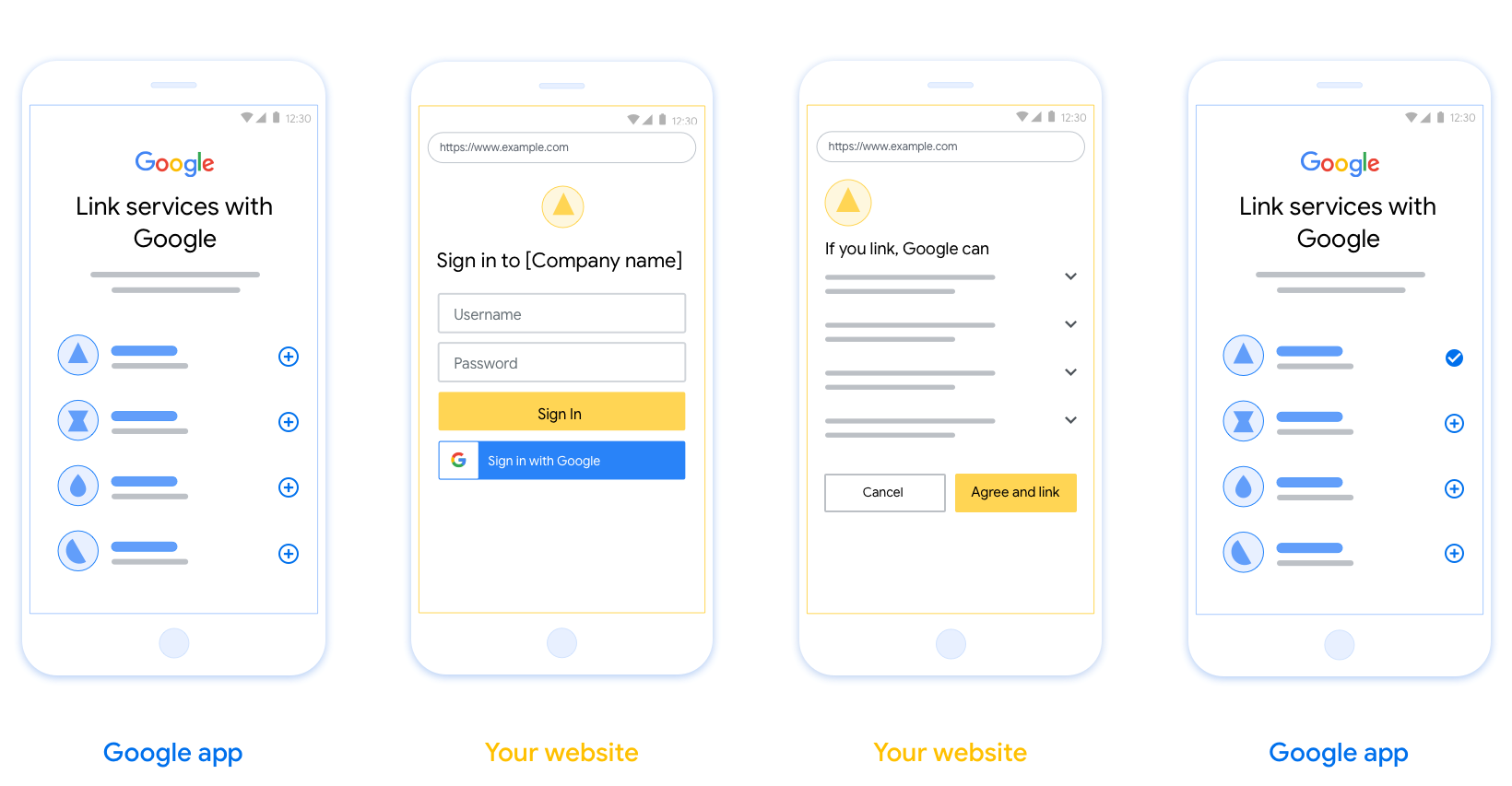
Требования
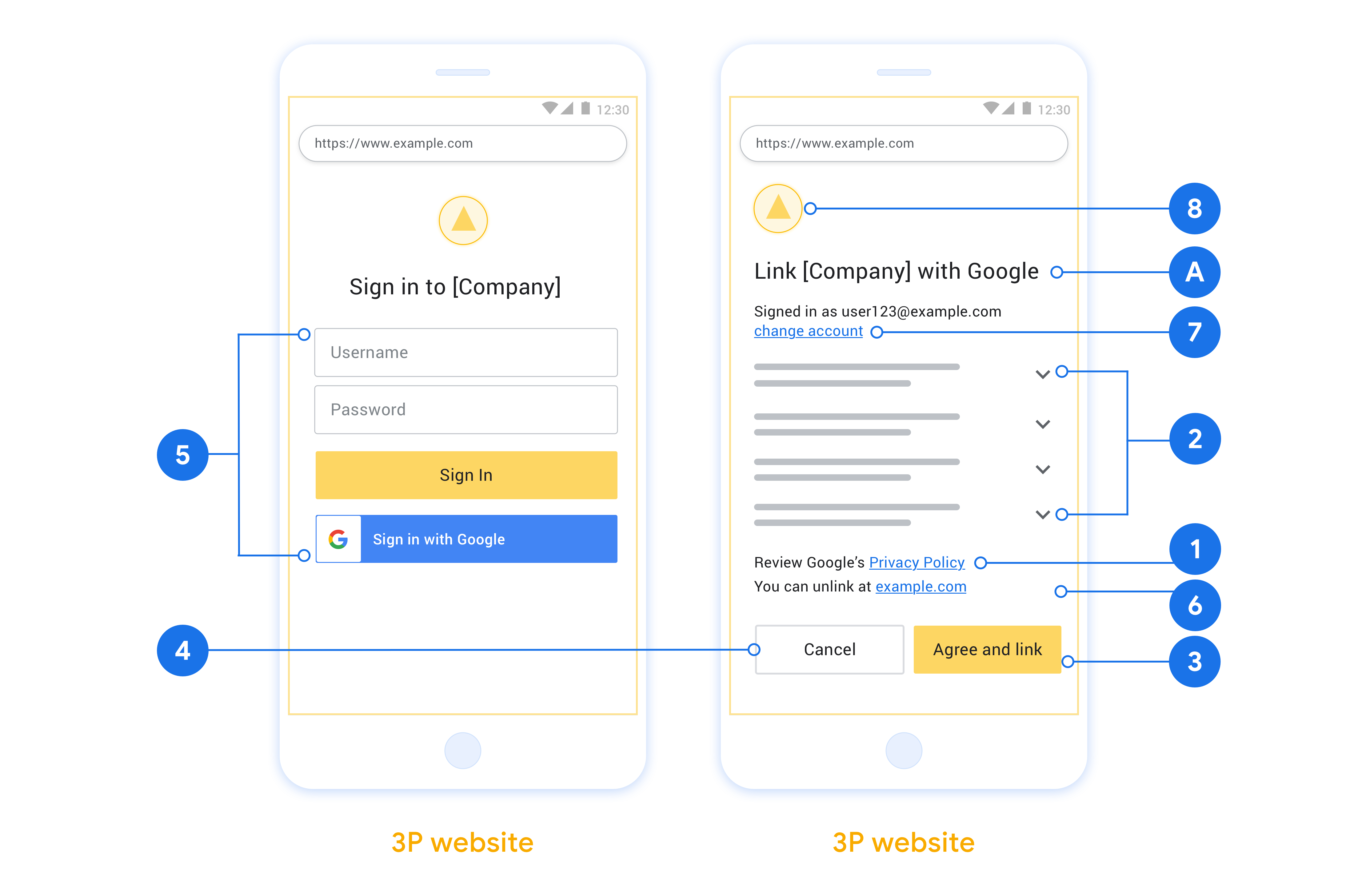
- Необходимо сообщить пользователю, что его учетная запись будет привязана к Google, а не к конкретному продукту Google, такому как Google Home или Google Assistant.
- Вам потребуется подтверждение авторизации от Google, например: «Входя в систему, вы разрешаете Google управлять вашими устройствами». См. раздел «Авторизация управления устройствами Google » в Политике разработчиков Google Home.
- Необходимо открыть страницу сопряжения Web OAuth и убедиться, что у пользователей есть понятный способ входа в свою учетную запись Google, например, поля для имени пользователя и пароля. Не используйте метод входа через Google (GSI), который позволяет пользователям входить в систему без перехода на страницу сопряжения Web OAuth. Это является нарушением политики Google.
- Для указания интеграции, на которую ссылается пользователь, на странице OAuth необходимо включить как минимум один из следующих элементов:
- Логотип компании
- Название компании
- Название интеграции
- значок приложения
Рекомендации
Мы рекомендуем вам сделать следующее:
Отобразите политику конфиденциальности Google. Включите ссылку на политику конфиденциальности Google на экране согласия.
Данные, которыми необходимо поделиться. Используйте ясный и лаконичный язык, чтобы сообщить пользователю, какие его данные Google запрашивает и почему, а также какие данные об использовании или взаимодействии могут быть переданы вам компанией Google.
Четкий призыв к действию. На экране согласия четко сформулируйте призыв к действию, например, «Согласиться и связать». Это необходимо, поскольку пользователи должны понимать, какие данные им необходимо предоставить Google для связи своих учетных записей.
Возможность отмены. Предоставьте пользователям возможность вернуться назад или отменить подписку, если они не захотят использовать ссылку.
Четкий процесс входа в систему. Убедитесь, что у пользователей есть понятный способ входа в свою учетную запись Google, например, поля для имени пользователя и пароля или возможность входа через Google .
Возможность отсоединения. Предоставьте пользователям механизм для отсоединения, например, URL-адрес настроек их учетной записи на вашей платформе. В качестве альтернативы вы можете включить ссылку на учетную запись Google , где пользователи могут управлять своей связанной учетной записью. Если пользователь отсоединяет учетную запись от вашей интеграции, используйте
agentUsers.delete, чтобы уведомить Google об изменении.Возможность смены учетной записи пользователя. Предложите пользователям способ смены учетных записей. Это особенно полезно, если у пользователей обычно несколько учетных записей.
- Если пользователю необходимо закрыть экран согласия для переключения между учетными записями, отправьте в Google устранимую ошибку, чтобы пользователь мог войти в нужную учетную запись с помощью привязки OAuth .
Добавьте свой логотип. Отобразите логотип вашей компании на экране согласия. Используйте свои рекомендации по стилю для размещения логотипа. Если вы также хотите отобразить логотип Google, см. раздел «Логотипы и товарные знаки» .
Поток авторизационного кода
Реализация OAuth 2.0 для процесса авторизации с кодом авторизации состоит из двух конечных точек, которые ваш сервис предоставляет по протоколу HTTPS. Первая конечная точка – это конечная точка авторизации, которая отвечает за поиск или получение согласия пользователей на доступ к данным. Конечная точка авторизации показывает пользователям, которые ещё не вошли в аккаунт, интерфейс входа и регистрирует согласие на запрошенный доступ. Вторая конечная точка – это конечная точка обмена токенами, которая используется для получения зашифрованных строк, называемых токенами, которые предоставляют пользователю доступ к вашему сервису.
Когда приложению Google нужно вызвать один из API вашего сервиса, Google использует эти конечные точки, чтобы получить разрешение от ваших пользователей на вызов этих API от их имени.
Сеанс обработки кода авторизации OAuth 2.0, инициированный Google, выполняется следующим образом:
- Google открывает конечную точку авторизации в браузере пользователя. Если процесс начался на устройстве без экрана, Google переносит выполнение на телефон.
- Пользователь входит в аккаунт, если ещё не сделал этого, и предоставляет Google разрешение на доступ к своим данным с помощью вашего API, если ещё не сделал этого.
- Ваш сервис создает код авторизации и возвращает его в Google. Для этого перенаправьте браузер пользователя обратно в Google с кодом авторизации, прикрепленным к запросу.
- Google отправляет код авторизации в конечную точку обмена токенами, которая проверяет подлинность кода и возвращает токен доступа и токен обновления. Токен доступа – это токен с коротким сроком действия, который ваш сервис принимает в качестве учетных данных для доступа к API. Токен обновления – это долгоживущий токен, который Google может хранить и использовать для получения новых токенов доступа, когда срок действия старых истекает.
- После того как пользователь завершит процесс связывания аккаунтов, каждый последующий запрос, отправленный из Google, будет содержать токен доступа.
Как обрабатывать запросы на авторизацию
Когда вам нужно связать аккаунты с помощью потока кода авторизации OAuth 2.0, Google отправляет пользователя в вашу конечную точку авторизации с запросом, который включает следующие параметры:
| Параметры конечной точки авторизации | |
|---|---|
client_id |
Идентификатор клиента, назначенный вами Google. |
redirect_uri |
URL, на который вы отправляете ответ на этот запрос. |
state |
Значение, которое передается обратно в Google без изменений в URI переадресации. |
scope |
Необязательно. Набор строк области действия, разделенных пробелами, которые указывают, к каким данным Google запрашивает авторизацию. |
response_type |
Тип значения, которое нужно вернуть в ответе. При обработке кода авторизации OAuth 2.0 тип ответа всегда code.
|
Например, если конечная точка авторизации доступна по адресу https://myservice.example.com/auth, запрос может выглядеть следующим образом:
GET https://myservice.example.com/auth?client_id=GOOGLE_CLIENT_ID&redirect_uri=REDIRECT_URI&state=STATE_STRING&scope=REQUESTED_SCOPES&response_type=code
Чтобы конечная точка авторизации обрабатывала запросы на вход, выполните следующие действия:
- Убедитесь, что
client_idсоответствует идентификатору клиента, назначенному вами Google, аredirect_uri– URL переадресации, предоставленному Google для вашего сервиса. Эти проверки важны, чтобы предотвратить предоставление доступа непреднамеренным или неправильно настроенным клиентским приложениям. Если вы поддерживаете несколько потоков OAuth 2.0, убедитесь, что параметрresponse_typeимеет значениеcode. - Проверьте, вошел ли пользователь в ваш сервис. Если пользователь не вошел в аккаунт, выполните вход или регистрацию в сервисе.
- Сгенерируйте код авторизации, который Google будет использовать для доступа к вашему API. Код авторизации может быть любой строкой, но он должен уникальным образом представлять пользователя, клиента, для которого предназначен токен, и время истечения срока действия кода. Кроме того, код не должен быть угадываемым. Обычно коды авторизации действуют около 10 минут.
- Убедитесь, что URL, указанный в параметре
redirect_uri, имеет следующий формат:https://oauth-redirect.googleusercontent.com/r/YOUR_PROJECT_ID https://oauth-redirect-sandbox.googleusercontent.com/r/YOUR_PROJECT_ID
- Перенаправить браузер пользователя на URL, указанный в параметре
redirect_uri. При переадресации добавьте сгенерированный код авторизации и исходное значение параметра state, не изменяя его, с помощью параметровcodeиstate. Пример полученного URL:https://oauth-redirect.googleusercontent.com/r/YOUR_PROJECT_ID?code=AUTHORIZATION_CODE&state=STATE_STRING
Как обрабатывать запросы на обмен токенов
Конечная точка обмена токенов вашего сервиса отвечает за два типа обмена токенов:
- Обменивать коды авторизации на токены доступа и токены обновления.
- Как обменивать токены обновления на токены доступа
Запросы на обмен токенов содержат следующие параметры:
| Параметры конечной точки обмена токенами | |
|---|---|
client_id |
Строка, которая указывает, что запрос был отправлен Google. Эта строка должна быть зарегистрирована в вашей системе как уникальный идентификатор Google. |
client_secret |
Секретная строка, которую вы зарегистрировали в Google для своего сервиса. |
grant_type |
Тип обмениваемого токена. authorization_code или refresh_token. |
code |
Если задано значение grant_type=authorization_code, этот параметр представляет собой код, полученный Google от конечной точки входа или обмена токенами. |
redirect_uri |
Если задано значение grant_type=authorization_code, этот параметр представляет собой URL, используемый в исходном запросе авторизации. |
refresh_token |
Если задано значение grant_type=refresh_token, этот параметр представляет собой токен обновления, полученный Google от конечной точки обмена токенами. |
Как Google отправляет учетные данные на ваш сервер
В зависимости от реализации сервер авторизации ожидает получить учетные данные клиента либо в теле запроса, либо в заголовке запроса.
По умолчанию Google отправляет учетные данные в теле запроса. Если сервер авторизации требует, чтобы учетные данные клиента были в заголовке запроса, вам необходимо настроить интеграцию Cloud-to-cloud следующим образом:
В списке проектов нажмите Открыть рядом с нужным проектом.
В разделе Облако-облако выберите Разработка.
Нажмите Открыть рядом с нужной интеграцией.
Прокрутите страницу вниз до раздела Разрешения (необязательно) и установите флажок Передавать идентификатор и секретный код клиента через заголовок базовой аутентификации HTTP.
Нажмите Сохранить.
Обменивать коды авторизации на токены доступа и токены обновления.
После того как пользователь выполнит вход и ваша конечная точка авторизации вернет Google код авторизации с коротким сроком действия, Google отправит запрос в вашу конечную точку обмена токенов, чтобы обменять код авторизации на токен доступа и токен обновления.
В таких запросах значение параметра grant_type – authorization_code, а значение параметра code – код авторизации, который вы ранее предоставили Google. Ниже приведен пример запроса на обмен кода авторизации на токен доступа и токен обновления:
POST /token HTTP/1.1
Host: oauth2.example.com
Content-Type: application/x-www-form-urlencoded

client_id=GOOGLE_CLIENT_ID&client_secret=GOOGLE_CLIENT_SECRET&grant_type=authorization_code&code=AUTHORIZATION_CODE&redirect_uri=REDIRECT_URI
Чтобы обменять коды авторизации на токен доступа и токен обновления, конечная точка обмена токенов отвечает на запросы POST, выполняя следующие действия:
- Убедитесь, что параметр
client_idопределяет источник запроса как авторизованный, а параметрclient_secretсоответствует ожидаемому значению. - Убедитесь, что код авторизации действителен и не просрочен, а идентификатор клиента, указанный в запросе, соответствует идентификатору клиента, связанному с кодом авторизации.
- Убедитесь, что URL, указанный в параметре
redirect_uri, совпадает со значением, использованным в исходном запросе авторизации. - Если вы не можете подтвердить все перечисленные выше критерии, верните ошибку HTTP 400 Bad Request с
{"error": "invalid_grant"}в качестве тела. - В противном случае используйте идентификатор пользователя из кода авторизации, чтобы создать токен обновления и токен доступа. Токены могут быть любыми строковыми значениями, но они должны уникальным образом представлять пользователя и клиента, для которого предназначен токен, и их нельзя угадать. Для токенов доступа также запишите время истечения срока действия токена, которое обычно составляет один час после выдачи токена. Срок действия токенов обновления не истекает.
- В теле ответа HTTPS верните следующий объект JSON:
{
"token_type": "Bearer",
"access_token": "ACCESS_TOKEN",
"refresh_token": "REFRESH_TOKEN",
"expires_in": SECONDS_TO_EXPIRATION
}
Google сохраняет токен доступа и токен обновления для пользователя и записывает срок действия токена доступа. Когда срок действия токена доступа истекает, Google использует токен обновления, чтобы получить новый токен доступа из конечной точки обмена токенами.
Как обменивать токены обновления на токены доступа
Когда срок действия токена доступа истекает, Google отправляет запрос в конечную точку обмена токенов, чтобы обменять токен обновления на новый токен доступа.
В этих запросах значение grant_type – refresh_token, а значение refresh_token – токен обновления, который вы ранее предоставили Google. Ниже приведен пример запроса на обмен токена обновления на токен доступа:
POST /token HTTP/1.1
Host: oauth2.example.com
Content-Type: application/x-www-form-urlencoded

client_id=GOOGLE_CLIENT_ID&client_secret=GOOGLE_CLIENT_SECRET&grant_type=refresh_token&refresh_token=REFRESH_TOKEN
Чтобы обменять токен обновления на токен доступа, конечная точка обмена токенами должна отвечать на запросы POST, выполняя следующие действия:
- Убедитесь, что
client_idуказывает на Google как источник запроса и чтоclient_secretсоответствует ожидаемому значению. - Убедитесь, что токен обновления действителен и что идентификатор клиента, указанный в запросе, соответствует идентификатору клиента, связанному с токеном обновления.
- Если вы не можете подтвердить все перечисленные выше критерии, верните ошибку HTTP 400 Bad Request с
{"error": "invalid_grant"}в качестве тела. - В противном случае используйте идентификатор пользователя из токена обновления, чтобы создать токен доступа. Токены могут быть любыми строковыми значениями, но они должны уникальным образом представлять пользователя и клиента, для которого предназначен токен, и их нельзя угадать. Для токенов доступа также запишите время истечения срока действия токена, обычно через час после его выдачи.
- Верните следующий объект JSON в теле ответа HTTPS:
{
"token_type": "Bearer",
"access_token": "ACCESS_TOKEN",
"expires_in": SECONDS_TO_EXPIRATION
}
Обработка запросов информации о пользователях
Конечная точка userinfo — это ресурс, защищенный OAuth 2.0, который возвращает утверждения о связанном пользователе. Реализация и размещение конечной точки userinfo не является обязательной, за исключением следующих случаев использования:
- Вход в связанную учетную запись с помощью Google One Tap.
- Простая подписка на AndroidTV.
После того как токен доступа был успешно получен из конечной точки вашего токена, Google отправляет запрос в конечную точку информации о пользователе, чтобы получить основную информацию профиля связанного пользователя.
| заголовки запроса конечной точки userinfo | |
|---|---|
Authorization header | Токен доступа типа Bearer. |
Например, если ваша конечная точка userinfo доступна по адресу https://myservice.example.com/userinfo , запрос может выглядеть следующим образом:
GET /userinfo HTTP/1.1
Host: myservice.example.com
Authorization: Bearer ACCESS_TOKEN
Чтобы ваша конечная точка userinfo могла обрабатывать запросы, выполните следующие действия:
- Извлеките токен доступа из заголовка авторизации и верните информацию для пользователя, связанного с токеном доступа.
- Если токен доступа недействителен, верните ошибку HTTP 401 Unauthorized с использованием заголовка ответа
WWW-Authenticate. Ниже приведен пример ответа об ошибке с информацией о пользователе:HTTP/1.1 401 Unauthorized WWW-Authenticate: error="invalid_token", error_description="The Access Token expired"
Если токен доступа действителен, верните ответ HTTP 200 со следующим объектом JSON в теле ответа HTTPS:
{ "sub": "USER_UUID", "email": "EMAIL_ADDRESS", "given_name": "FIRST_NAME", "family_name": "LAST_NAME", "name": "FULL_NAME", "picture": "PROFILE_PICTURE", }ответ конечной точки с информацией о пользователе subУникальный идентификатор, идентифицирующий пользователя в вашей системе. emailАдрес электронной почты пользователя. given_nameНеобязательно: Имя пользователя. family_nameНеобязательно: фамилия пользователя. nameНеобязательно: Полное имя пользователя. pictureНеобязательно: изображение профиля пользователя.