

هر یکپارچهسازی Cloud-to-cloud باید شامل مکانیزمی برای احراز هویت کاربران باشد.
احراز هویت به شما این امکان را میدهد که حسابهای گوگل کاربران خود را با حسابهای کاربری در سیستم احراز هویت خود پیوند دهید. این به شما امکان میدهد تا کاربران خود را هنگامی که سفارش شما یک هدف خانه هوشمند دریافت میکند، شناسایی کنید. خانه هوشمند گوگل فقط از OAuth با جریان کد مجوز پشتیبانی میکند.
این صفحه نحوه تنظیم سرور OAuth 2.0 شما را به گونهای شرح میدهد که با ادغام Cloud-to-cloud شما کار کند.
اتصال حساب گوگل با OAuth
در جریان کد مجوز ، به دو نقطه پایانی نیاز دارید:
نقطه پایانی مجوز ، که رابط کاربری ورود به سیستم را به کاربرانی که هنوز وارد سیستم نشدهاند، نمایش میدهد. نقطه پایانی مجوز همچنین یک کد مجوز کوتاهمدت ایجاد میکند تا رضایت کاربران برای دسترسی درخواستی را ثبت کند.
نقطه پایانی تبادل توکن ، که مسئول دو نوع تبادل است:
- یک کد مجوز را با یک توکن بهروزرسانی طولانیمدت و یک توکن دسترسی کوتاهمدت مبادله میکند. این تبادل زمانی اتفاق میافتد که کاربر از جریان اتصال حساب عبور میکند.
- یک توکن بهروزرسانی بلندمدت را با یک توکن دسترسی کوتاهمدت تعویض میکند. این تعویض زمانی اتفاق میافتد که گوگل به یک توکن دسترسی جدید نیاز دارد، زیرا توکنی که منقضی شده بود.
دستورالعملهای طراحی
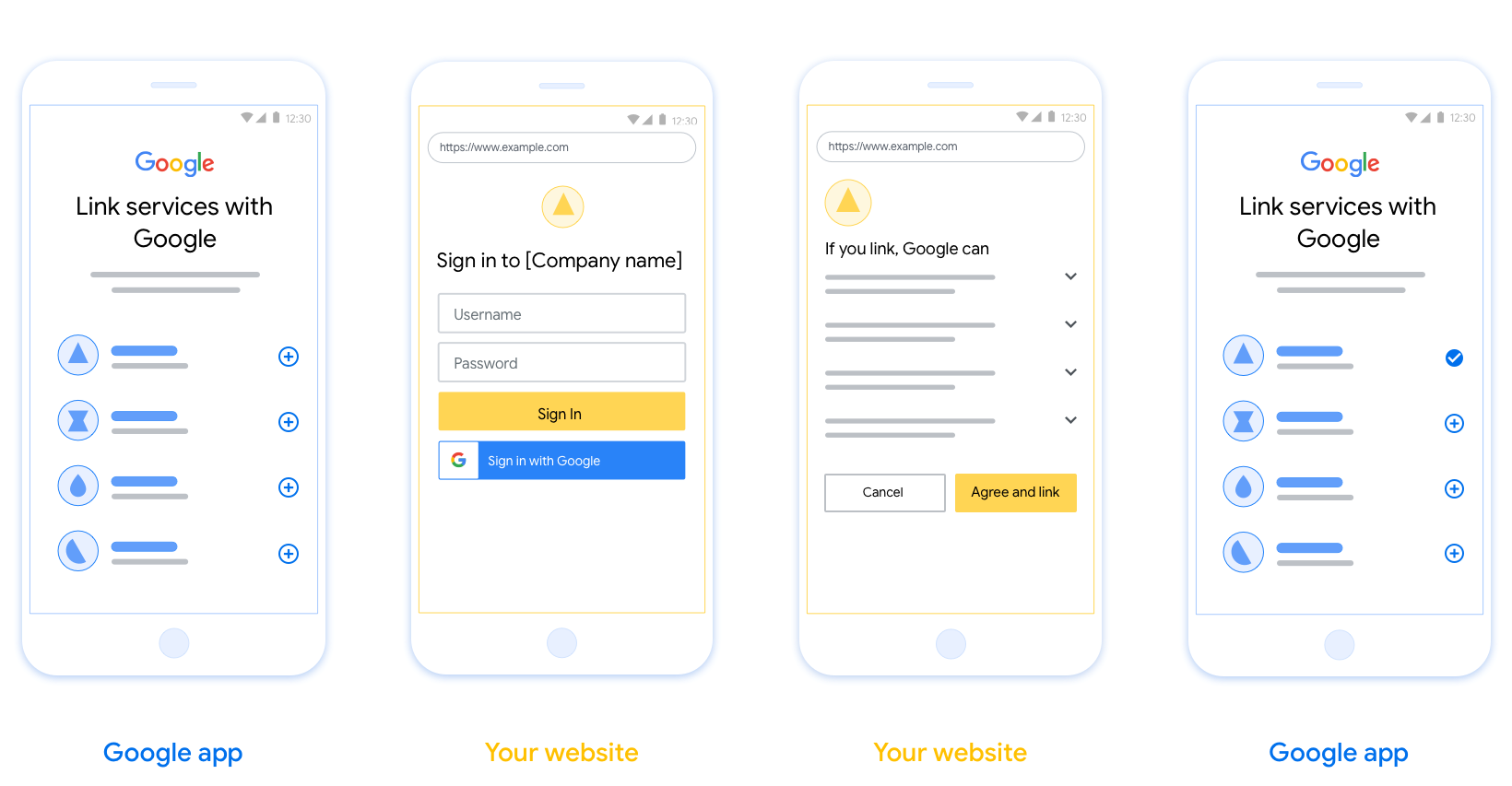
این بخش الزامات و توصیههای طراحی برای صفحه کاربری که شما برای جریانهای لینکدهی OAuth میزبانی میکنید را شرح میدهد. پس از فراخوانی توسط برنامه گوگل، پلتفرم شما صفحه ورود به گوگل و صفحه رضایت لینکدهی حساب را به کاربر نمایش میدهد. کاربر پس از اعلام رضایت خود برای لینکدهی حسابها، به برنامه گوگل هدایت میشود.
الزامات
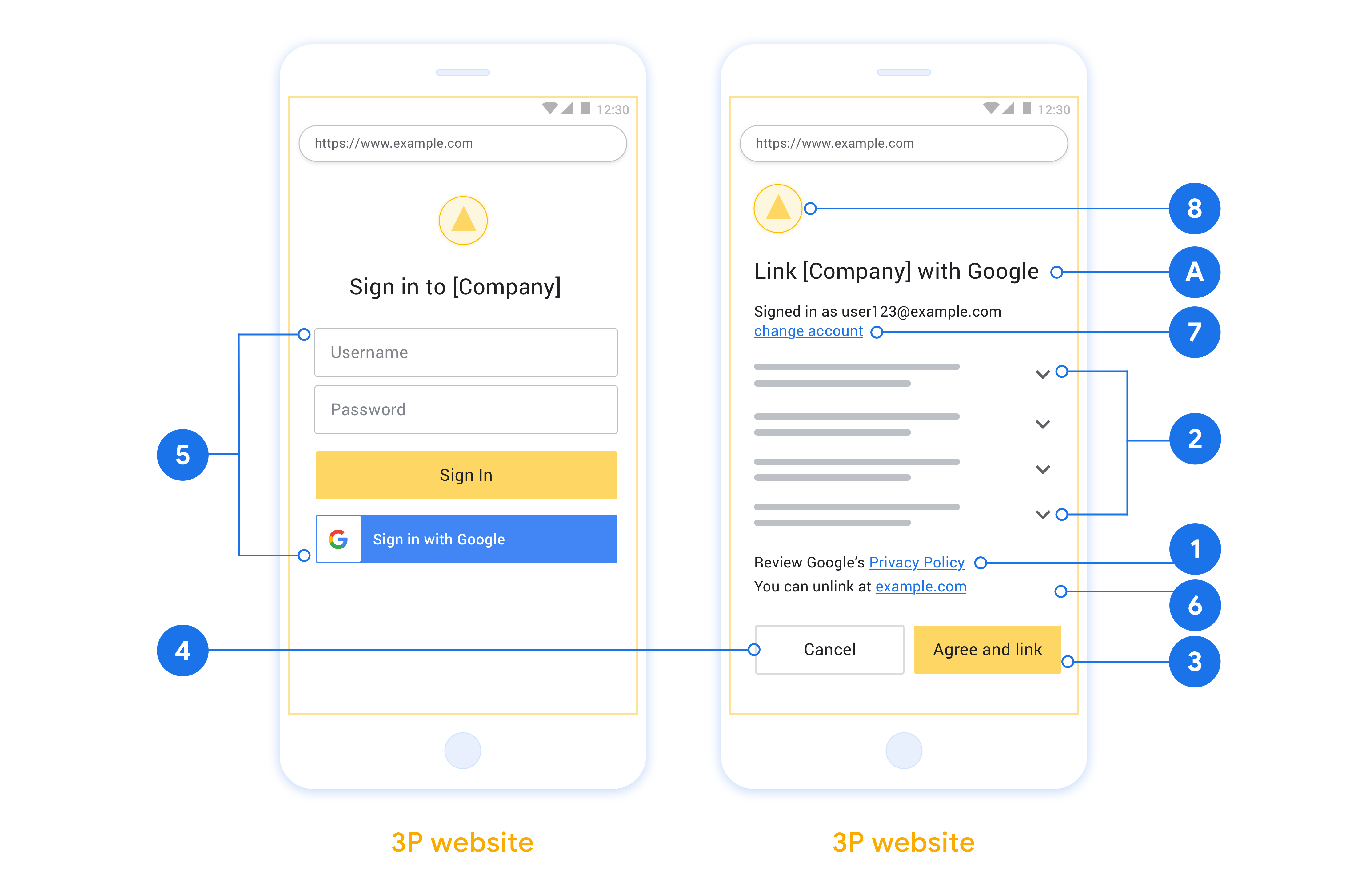
- شما باید به کاربر اطلاع دهید که حساب کاربری به گوگل متصل خواهد شد، نه به یک محصول خاص گوگل مانند گوگل هوم یا گوگل اسیستنت.
- شما باید یک عبارت مجوز گوگل مانند «با ورود به سیستم، شما به گوگل اجازه میدهید دستگاههای شما را کنترل کند» داشته باشید. به بخش مجوز کنترل دستگاه گوگل در سیاستهای توسعهدهندگان گوگل هوم مراجعه کنید.
- شما باید صفحه پیونددهی Web OAuth را باز کنید و مطمئن شوید که کاربران روش واضحی برای ورود به حساب گوگل خود، مانند فیلدهای نام کاربری و رمز عبور، دارند. از روش ورود به سیستم گوگل (GSI) که به کاربران امکان میدهد بدون هدایت به صفحه پیونددهی Web OAuth، پیوند برقرار کنند، استفاده نکنید. این کار نقض خطمشی گوگل است.
- شما باید حداقل یکی از موارد زیر را در صفحه لینکدهی OAuth قرار دهید تا نشان دهید که کاربر به چه نوع ادغامی لینک میدهد:
- لوگوی شرکت
- نام شرکت
- نام ادغام
- آیکون برنامه
توصیهها
توصیه میکنیم موارد زیر را انجام دهید:
سیاست حفظ حریم خصوصی گوگل را نمایش دهید. پیوندی به سیاست حفظ حریم خصوصی گوگل را در صفحه رضایتنامه قرار دهید.
دادههایی که باید به اشتراک گذاشته شوند. با زبانی واضح و مختصر به کاربر بگویید که گوگل به چه دادههایی از او نیاز دارد و چرا، و اینکه گوگل چه دادههای استفاده یا تعاملی را ممکن است با شما به اشتراک بگذارد.
فراخوان عمل واضح. در صفحه رضایت خود، یک فراخوان عمل واضح مانند «موافقت و پیوند» بیان کنید. دلیل این امر این است که کاربران باید بدانند برای پیوند دادن حسابهایشان، چه دادههایی را باید با گوگل به اشتراک بگذارند.
امکان لغو. در صورتی که کاربران تمایلی به لینک دادن نداشته باشند، راهی برای بازگشت یا لغو آن فراهم کنید.
فرآیند ورود به سیستم را شفاف کنید. مطمئن شوید که کاربران روش واضحی برای ورود به حساب گوگل خود دارند، مانند فیلدهای نام کاربری و رمز عبور یا ورود با گوگل .
امکان لغو پیوند. مکانیزمی برای لغو پیوند کاربران ارائه دهید، مانند یک URL به تنظیمات حساب کاربری آنها در پلتفرم شما. از طرف دیگر، میتوانید پیوندی به حساب گوگل قرار دهید که کاربران بتوانند در آن حساب پیوند شده خود را مدیریت کنند. اگر کاربری از ادغام شما لغو پیوند کرد، از
agentUsers.deleteبرای اطلاعرسانی به گوگل در مورد این تغییر استفاده کنید.امکان تغییر حساب کاربری. روشی را برای کاربران پیشنهاد دهید تا حساب(های) خود را تغییر دهند. این امر به ویژه در صورتی مفید است که کاربران تمایل به داشتن چندین حساب داشته باشند.
- اگر کاربری برای تغییر حساب کاربری باید صفحه رضایت را ببندد، یک خطای قابل بازیابی به گوگل ارسال کنید تا کاربر بتواند با پیوند OAuth وارد حساب مورد نظر خود شود.
لوگوی خود را قرار دهید. لوگوی شرکت خود را در صفحه رضایتنامه نمایش دهید. از دستورالعملهای سبک خود برای قرار دادن لوگوی خود استفاده کنید. اگر میخواهید لوگوی گوگل را نیز نمایش دهید، به بخش لوگوها و علائم تجاری مراجعه کنید.
جریان کد مجوز
پیادهسازی سرور OAuth 2.0 از جریان کد مجوز شامل دو نقطه پایان است که سرویس شما ازطریق HTTPS دردسترس قرار میدهد. اولین نقطه پایانی نقطه پایانی مجوز است که مسئول یافتن یا دریافت موافقت کاربران برای دسترسی به دادهها است. نقطه پایانی مجوز یک واسط کاربری ورود به سیستم به کاربرانی که قبلاً به سیستم وارد نشدهاند ارائه میدهد و رضایت را برای دسترسی درخواستی ثبت میکند. نقطه پایانی دوم نقطه پایانی تبادل کد است که برای دریافت رشتههای رمزگذاریشدهای بهنام کد استفاده میشود که به کاربر اجازه میدهد به سرویس شما دسترسی داشته باشد.
وقتی یکی از برنامههای Google نیاز دارد یکی از میاناهای برنامهسازی کاربردی سرویس شما را فراخوانی کند، Google از این نقطههای پایانی باهم استفاده میکند تا از کاربران شما اجازه فراخوانی این میاناهای برنامهسازی کاربردی را ازطرف آنها دریافت کند.
جلسه جریان کد مجوز OAuth 2.0 که توسط Google آغاز شده است، جریان زیر را دارد:
- Google نقطه پایان مجوز شما را در مرورگر کاربر باز میکند. اگر جریان در دستگاه فقط صوتی برای «کنش» شروع شود، Google اجرا را به تلفن منتقل میکند.
- کاربر به سیستم وارد میشود (اگر قبلاً وارد نشده باشد) و به Google اجازه میدهد بااستفاده از API شما به دادههایش دسترسی پیدا کند (اگر قبلاً اجازه نداده باشد).
- سرویس شما کد مجوز ایجاد میکند و آن را به Google برمیگرداند. برای انجام این کار، مرورگر کاربر را با کد مجوز پیوستشده به درخواست به Google هدایت کنید.
- Google کد مجوز را به نقطه پایان تبادل ژتون شما ارسال میکند، که اصالت کد را درستیسنجی میکند و ژتون دسترسی و ژتون بازآوری را برمیگرداند. کد دسترسی یک کد کوتاهمدت است که سرویس شما آن را بهعنوان اعتبارنامه برای دسترسی به میاناهای برنامهسازی کاربردی میپذیرد. ژتون بازآوری یک ژتون طولانیمدت است که Google میتواند آن را ذخیره کند و از آن برای دریافت ژتونهای دسترسی جدید پساز منقضی شدن آنها استفاده کند.
- پساز اینکه کاربر جریان پیوند دادن حساب را تکمیل کرد، هر درخواست بعدی که از Google ارسال میشود حاوی یک کد دسترسی است.
مدیریت درخواستهای مجوز
وقتی لازم است پیوند حساب را بااستفاده از جریان کد مجوز OAuth 2.0 انجام دهید، Google کاربر را با درخواستی که شامل پارامترهای زیر است به نقطه پایانی مجوز شما ارسال میکند:
| پارامترهای نقطه پایان مجوز | |
|---|---|
client_id |
«شناسه کارخواهی» که به Google اختصاص دادهاید. |
redirect_uri |
نشانی وبی که پاسخ این درخواست را به آن ارسال میکنید. |
state |
مقدار دفترداری که بدون تغییر در نشانی وب هدایت مجدد به Google برگردانده میشود. |
scope |
اختیاری: مجموعهای از رشتههای محدوده که با فاصله از هم جدا شدهاند و دادههایی را که Google برای آنها درخواست مجوز میکند مشخص میکنند. |
response_type |
نوع مقدار برای برگرداندن در پاسخ. برای جریان کد مجوز OAuth 2.0، نوع پاسخ همیشه code است.
|
برای مثال، اگر نقطه پایان مجوز شما در
https://myservice.example.com/auth دردسترس باشد، درخواست ممکن است بهصورت زیر باشد:
GET https://myservice.example.com/auth?client_id=GOOGLE_CLIENT_ID&redirect_uri=REDIRECT_URI&state=STATE_STRING&scope=REQUESTED_SCOPES&response_type=code
برای اینکه نقطه پایانی مجوز شما بتواند درخواستهای ورود به سیستم را مدیریت کند، مراحل زیر را انجام دهید:
- تأیید کنید که
client_idبا «شناسه کارخواه» که به Google اختصاص دادهاید مطابقت داشته باشد وredirect_uriبا نشانی وب هدایت مجدد ارائهشده توسط Google برای سرویس شما مطابقت داشته باشد. این بررسیها برای جلوگیری از اعطای دسترسی به برنامههای مشتری ناخواسته یا پیکربندیشده نادرست مهم است. اگر از چندین جریان OAuth 2.0 پشتیبانی میکنید، همچنین تأیید کنید کهresponse_typecodeاست. - بررسی کنید که آیا کاربر به سیستم سرویس شما وارد شده است یا نه. اگر کاربر به سیستم وارد نشده است، جریان ورود به سیستم یا ثبتنام سرویس خود را تکمیل کنید.
- کد مجوزی برای Google تولید کنید تا از آن برای دسترسی به API شما استفاده کند. کد مجوز میتواند هر مقدار رشتهای باشد، اما باید بهطور منحصربهفرد نشاندهنده کاربر، کارخواهی که رمز برای آن است، و زمان انقضای کد باشد، و نباید قابل حدس زدن باشد. معمولاً کدهای تأییدیهای صادر میکنید که تقریباً پساز ۱۰ دقیقه منقضی میشوند.
- تأیید کنید که نشانی وب مشخصشده توسط پارامتر
redirect_uriدارای شکل زیر است:https://oauth-redirect.googleusercontent.com/r/YOUR_PROJECT_ID https://oauth-redirect-sandbox.googleusercontent.com/r/YOUR_PROJECT_ID
- مرورگر کاربر را به نشانی وب مشخصشده توسط
پارامتر
redirect_uriهدایت کنید. هنگام هدایت مجدد با افزودن پارامترهایcodeوstate، کد مجوز تولیدشده و مقدار وضعیت اصلی و بدون تغییر را اضافه کنید. در زیر نمونهای از نشانی وب حاصل ارائه شده است:https://oauth-redirect.googleusercontent.com/r/YOUR_PROJECT_ID?code=AUTHORIZATION_CODE&state=STATE_STRING
مدیریت درخواستهای مبادله دادهواحد (توکن)
نقطه پایانی تبادل کد سرویس شما مسئول دو نوع تبادل کد است:
- تبدیل کدهای مجوز به کدهای دسترسی و کدهای بازآوری
- تبدیل کردن کدهای بازآوری به کدهای دسترسی
درخواستهای مبادله دادهواحد شامل پارامترهای زیر است:
| پارامترهای نقطه پایان تبادل کد | |
|---|---|
client_id |
رشتهای که منشأ درخواست را بهعنوان Google شناسایی میکند. این رشته باید در سیستم شما بهعنوان شناسه یکتای Google ثبت شود. |
client_secret |
رشته محرمانهای که برای سرویس خود در Google ثبت کردهاید. |
grant_type |
نوع توکن درحال مبادله. یا
authorization_code یا refresh_token است. |
code |
وقتی grant_type=authorization_code، این پارامتر کدی است که Google از نقطه پایانی ورود به سیستم یا تبادل رمز شما دریافت کرده است. |
redirect_uri |
وقتی grant_type=authorization_code، این پارامتر نشانی وب
استفادهشده در درخواست مجوز اولیه است. |
refresh_token |
وقتی grant_type=refresh_token، این پارامتر عبارت است از
ژتون بازآوری که Google از نقطه پایانی تبادل ژتون شما دریافت کرده است. |
پیکربندی نحوه ارسال اطلاعات اعتباری به سرور شما توسط Google
بسته به پیادهسازی آن، سرور مجوز شما انتظار دارد اعتبارنامههای کارخواه را یا در بدنه درخواست یا در سرایند درخواست دریافت کند.
بهطور پیشفرض، Google اطلاعات اعتباری را در بدنه درخواست ارسال میکند. اگر سرور مجوز شما نیاز دارد که اعتبارنامه کارخواه در سرایند درخواست باشد، باید یکپارچهسازی Cloud-to-cloud خود را مطابق با آن پیکربندی کنید:
از فهرست پروژهها، روی باز کردن در کنار پروژهای که میخواهید با آن کار کنید کلیک کنید.
در بخش Cloud-to-Cloud، گزینه توسعه را انتخاب کنید.
روی باز کردن در کنار یکپارچهسازی خود کلیک کنید.
به بخش اجازهها (اختیاری) پیمایش کنید و چارگوش Google شناسه مشتری و رمز را ازطریق سرایند اصالتسنجی پایه HTTP منتقل کند را انتخاب کنید.
برای ذخیره کردن تغییرات، روی ذخیره کلیک کنید.
تبدیل کدهای مجوز به کدهای دسترسی و کدهای بازآوری
پساز اینکه کاربر به سیستم وارد شد و نقطه پایانی مجوز شما کد مجوز کوتاهمدتی به Google برگرداند، Google درخواستی به نقطه پایانی تبادل ژتون شما ارسال میکند تا کد مجوز را با ژتون دسترسی و ژتون بازآوری معاوضه کند.
برای این درخواستها، مقدار grant_type برابر با authorization_code است و مقدار code برابر با مقدار کد
مجوزی است که قبلاً به Google اعطا کردهاید. در زیر نمونهای از درخواست مبادله کد
مجوز با کد دسترسی و کد بازآوری آورده شده است:
POST /token HTTP/1.1
Host: oauth2.example.com
Content-Type: application/x-www-form-urlencoded

client_id=GOOGLE_CLIENT_ID&client_secret=GOOGLE_CLIENT_SECRET&grant_type=authorization_code&code=AUTHORIZATION_CODE&redirect_uri=REDIRECT_URI
برای معاوضه کردن کدهای مجوز با کد دسترسی و کد بازآوری، نقطه پایان معاوضه کد شما با اجرای مراحل زیر به درخواستهای POST پاسخ میدهد:
- تأیید کنید که
client_idمنشأ درخواست را بهعنوان منشأ مجاز شناسایی میکند وclient_secretبا مقدار موردانتظار مطابقت دارد. - تأیید کنید که کد مجوز معتبر و منقضی نشده باشد و شناسه کارخواه مشخصشده در درخواست با شناسه کارخواه منسوب به کد مجوز مطابقت داشته باشد.
- تأیید کنید که نشانی وب مشخصشده توسط پارامتر
redirect_uriبا مقدار استفادهشده در درخواست صدور مجوز اولیه یکسان است. - اگر نمیتوانید همه معیارهای بالا را درستیسنجی کنید، خطای «درخواست بد» HTTP 400 را با
{"error": "invalid_grant"}بهعنوان بدنه برگردانید. - درغیراینصورت، از شناسه کاربر موجود در کد مجوز برای تولید یک کد بازآوری و یک کد دسترسی استفاده کنید. این نشانها میتوانند هر مقدار رشتهای باشند، اما باید بهطور منحصربهفرد کاربر و کارخواهی را که نشان برای آن است نشان دهند و نباید قابل حدس زدن باشند. برای رمزهای دسترسی، زمان انقضای رمز را نیز ثبت کنید که معمولاً یک ساعت پساز صدور رمز است. ژتونهای بازآوری منقضی نمیشوند.
- شیء JSON زیر را در بدنه پاسخ HTTPS برگردانید:
{
"token_type": "Bearer",
"access_token": "ACCESS_TOKEN",
"refresh_token": "REFRESH_TOKEN",
"expires_in": SECONDS_TO_EXPIRATION
}
Google کد دسترسی و کد بازآوری را برای کاربر ذخیره میکند و انقضای کد دسترسی را ثبت میکند. وقتی کد دسترسی منقضی میشود، Google از کد بازآوری برای دریافت کد دسترسی جدید از نقطه پایانی تبادل کد شما استفاده میکند.
تبدیل کردن کدهای بازآوری به کدهای دسترسی
وقتی کد دسترسی منقضی میشود، Google درخواستی به نقطه پایانی تبادل کد شما ارسال میکند تا کد بازآوری را با کد دسترسی جدید معاوضه کند.
برای این درخواستها، مقدار grant_type برابر با refresh_token است و مقدار
refresh_token مقدار رمز بازآوری است که قبلاً به Google اعطا کردهاید. در زیر نمونهای از درخواست مبادله کردن کد نوسازی
برای کد دسترسی آورده شده است:
POST /token HTTP/1.1
Host: oauth2.example.com
Content-Type: application/x-www-form-urlencoded

client_id=GOOGLE_CLIENT_ID&client_secret=GOOGLE_CLIENT_SECRET&grant_type=refresh_token&refresh_token=REFRESH_TOKEN
برای تبدیل کردن یک ژتون بازآوری به یک ژتون دسترسی، نقطه پایانی تبدیل ژتون شما
با اجرای مراحل زیر به درخواستهای POST پاسخ میدهد:
- تأیید کنید که
client_idمنشأ درخواست را Google شناسایی میکند وclient_secretبا مقدار موردانتظار مطابقت دارد. - تأیید کنید که کد نوسازی معتبر است و شناسه مشتری مشخصشده در درخواست با شناسه مشتری منسوب به کد نوسازی مطابقت دارد.
- اگر نمیتوانید همه معیارهای بالا را درستیسنجی کنید، خطای «درخواست بد» HTTP 400 با
{"error": "invalid_grant"}بهعنوان بدنه برگردانید. - درغیراینصورت، از شناسه کاربر موجود در کد بازآوری برای تولید کد دسترسی استفاده کنید. این نشانها میتوانند هر مقدار رشتهای باشند، اما باید بهطور منحصربهفرد نشاندهنده کاربر و کارخواهی باشند که نشان برای آن است، و نباید قابل حدس زدن باشند. برای کد دسترسی، زمان انقضای کد را نیز ثبت کنید، معمولاً یک ساعت پساز صدور کد.
- شیء JSON زیر را در بدنه پاسخ HTTPS برگردانید:
{
"token_type": "Bearer",
"access_token": "ACCESS_TOKEN",
"expires_in": SECONDS_TO_EXPIRATION
}
رسیدگی به درخواست های اطلاعات کاربر
نقطه پایانی userinfo یک منبع محافظت شده OAuth 2.0 است که ادعاهای مربوط به کاربر پیوند شده را برمیگرداند. پیاده سازی و میزبانی نقطه پایانی اطلاعات کاربر اختیاری است، به جز موارد استفاده زیر:
- ورود به سیستم حساب پیوندی با Google One Tap.
- اشتراک بدون اصطکاک در AndroidTV.
پس از اینکه رمز دسترسی با موفقیت از نقطه پایانی نشانه شما بازیابی شد، Google درخواستی را به نقطه پایانی اطلاعات کاربری شما ارسال می کند تا اطلاعات نمایه اولیه کاربر پیوند داده شده را بازیابی کند.
| سرصفحه های درخواست نقطه پایانی کاربر | |
|---|---|
Authorization header | نشانه دسترسی از نوع Bearer. |
به عنوان مثال، اگر نقطه پایانی اطلاعات کاربری شما در https://myservice.example.com/userinfo در دسترس باشد، ممکن است یک درخواست به شکل زیر باشد:
GET /userinfo HTTP/1.1
Host: myservice.example.com
Authorization: Bearer ACCESS_TOKEN
برای اینکه نقطه پایانی اطلاعات کاربری شما به درخواستها رسیدگی کند، مراحل زیر را انجام دهید:
- رمز دسترسی را از سربرگ Authorization استخراج کنید و اطلاعات کاربر مرتبط با نشانه دسترسی را برگردانید.
- اگر رمز دسترسی نامعتبر است، با استفاده از سربرگ پاسخ
WWW-Authenticateخطای غیرمجاز HTTP 401 را برگردانید. در زیر نمونه ای از پاسخ خطای userinfo آورده شده است:HTTP/1.1 401 Unauthorized WWW-Authenticate: error="invalid_token", error_description="The Access Token expired"
اگر نشانه دسترسی معتبر است، برگردانید و HTTP 200 را با شی JSON زیر در بدنه پاسخ HTTPS پاسخ دهید:
{ "sub": "USER_UUID", "email": "EMAIL_ADDRESS", "given_name": "FIRST_NAME", "family_name": "LAST_NAME", "name": "FULL_NAME", "picture": "PROFILE_PICTURE", }پاسخ نقطه پایانی اطلاعات کاربر subیک شناسه منحصر به فرد که کاربر را در سیستم شما شناسایی می کند. emailآدرس ایمیل کاربر. given_nameاختیاری: نام کاربر. family_nameاختیاری: نام خانوادگی کاربر. nameاختیاری: نام کامل کاربر. pictureاختیاری: تصویر نمایه کاربر.