

모든 Cloud-to-cloud 통합에는 사용자를 인증하는 메커니즘이 포함되어야 합니다.
인증을 사용하면 사용자의 Google 계정을 인증 시스템의 사용자 계정과 연결할 수 있습니다. 이렇게 하면 이행이 스마트 홈 인텐트를 수신할 때 사용자를 식별할 수 있습니다. Google 스마트 홈은 승인 코드 플로우가 있는 OAuth만 지원합니다.
이 페이지에서는 OAuth 2.0 서버를 설정하여 Cloud-to-cloud 통합과 호환되도록 하는 방법을 설명합니다.
OAuth를 사용한 Google 계정 연결
승인 코드 흐름에는 두 개의 엔드포인트가 필요합니다.
아직 로그인하지 않은 사용자에게 로그인 UI를 표시하는 승인 엔드포인트 승인 엔드포인트는 요청된 액세스에 대한 사용자의 동의를 기록하기 위해 단기 승인 코드도 생성합니다.
두 가지 유형의 교환을 담당하는 토큰 교환 엔드포인트
- 승인 코드를 장기 갱신 토큰 및 단기 액세스 토큰으로 교환합니다. 이 교환은 사용자가 계정 연결 흐름을 진행할 때 발생합니다.
- 장기 갱신 토큰을 단기 액세스 토큰으로 교환합니다. 이 교환은 Google이 보유한 액세스 토큰이 만료되어 새 액세스 토큰이 필요할 때 발생합니다.
디자인 가이드라인
이 섹션에서는 OAuth 연결 흐름을 위해 호스팅하는 사용자 화면의 디자인 요구사항과 권장사항을 설명합니다. Google 앱에서 호출한 후 플랫폼은 사용자에게 Google 로그인 페이지와 계정 연결 동의 화면을 표시합니다. 사용자가 계정 연결에 동의하면 Google 앱으로 다시 리디렉션됩니다.
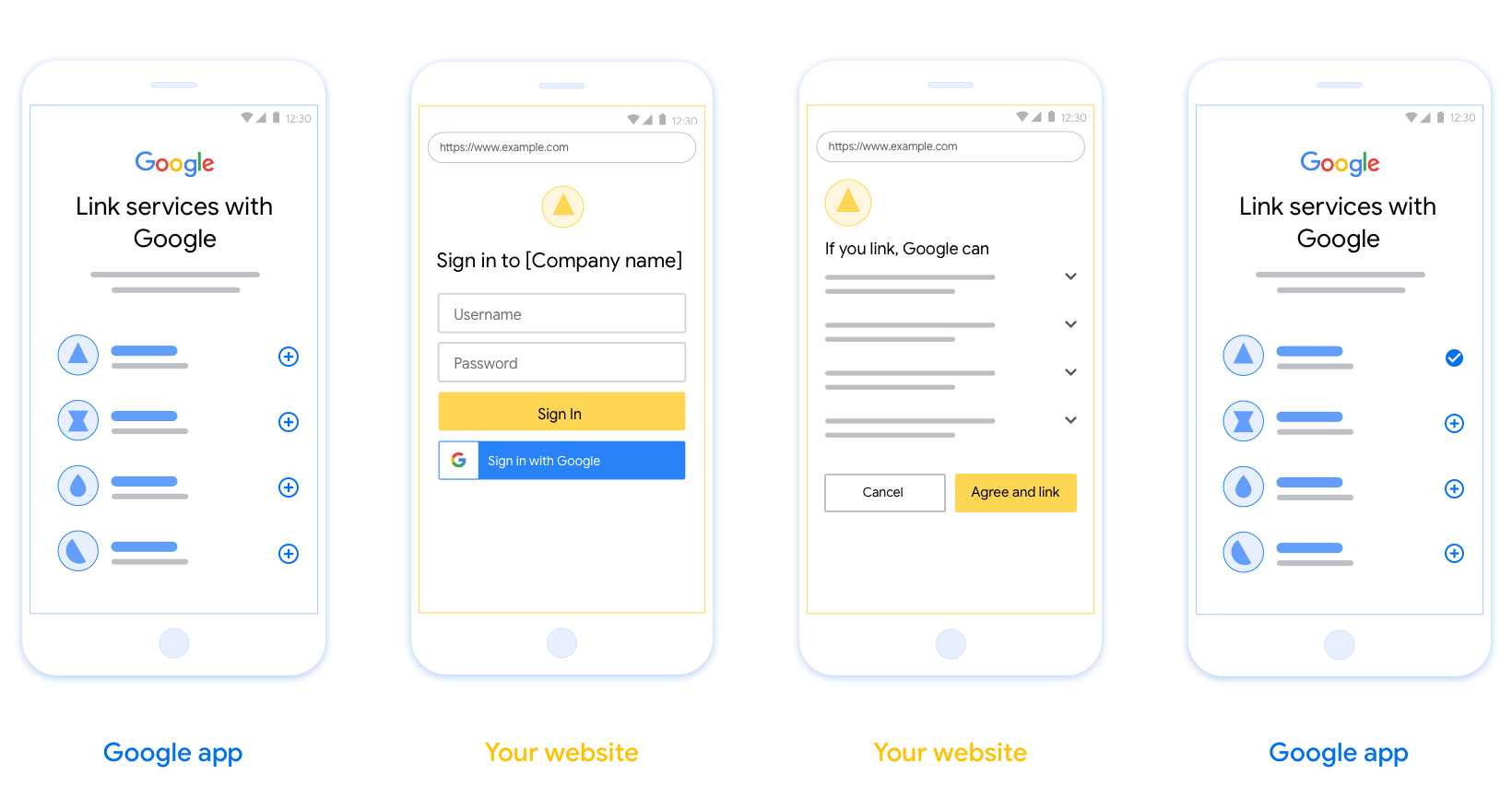
요구사항
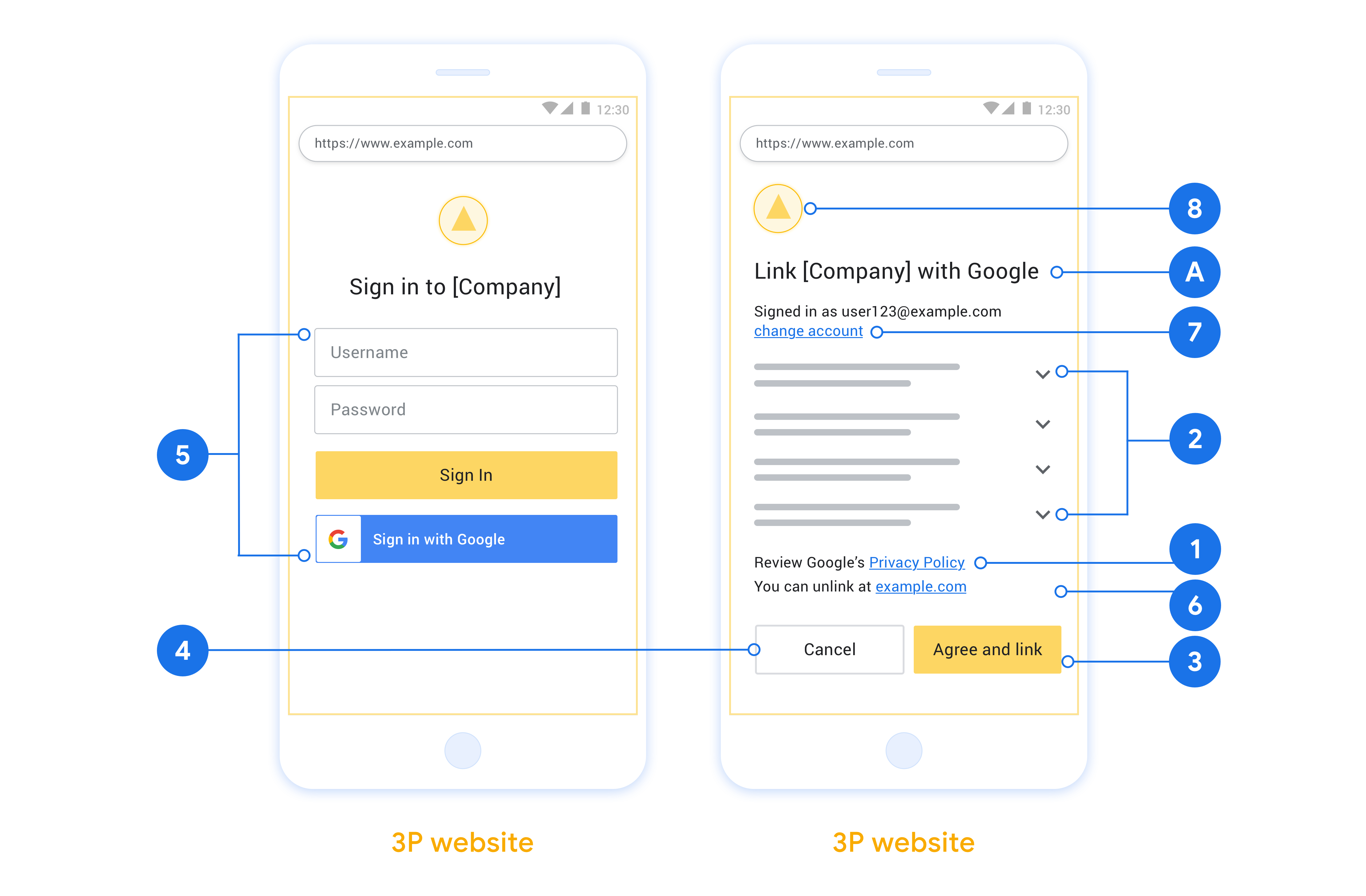
- 사용자의 계정이 Google Home 또는 Google 어시스턴트와 같은 특정 Google 제품이 아닌 Google에 연결된다고 전달해야 합니다.
- '로그인하면 Google이 기기를 제어할 수 있도록 승인하는 것입니다.'와 같은 Google 승인 문구가 있어야 합니다. Google Home 개발자 정책의 Google 기기 제어 승인 섹션을 참고하세요.
- 웹 OAuth 연결 페이지를 열고 사용자 이름 및 비밀번호 필드와 같이 사용자가 Google 계정에 로그인할 수 있는 명확한 방법이 있는지 확인해야 합니다. 사용자가 웹 OAuth 연결 페이지로 이동하지 않고도 연결할 수 있는 Google 로그인 (GSI) 방법을 사용하지 마세요. 이는 Google 정책을 위반하는 것입니다.
- 사용자가 연결하는 통합을 나타내려면 OAuth 연결 페이지에 다음 항목 중 하나 이상을 포함해야 합니다.
- 회사 로고
- 회사 이름
- 통합 이름
- 앱 아이콘
권장사항
다음을 수행하는 것이 좋습니다.
Google 개인정보처리방침을 표시합니다. 동의 화면에 Google 개인정보처리방침 으로 연결되는 링크를 포함합니다.
공유할 데이터. 명확하고 간결한 언어를 사용하여 Google에 필요한 사용자 데이터와 그 이유, Google에서 공유할 수 있는 사용량 또는 상호작용 데이터를 사용자에게 알립니다.
명확한 클릭 유도문안. '동의 및 연결'과 같이 동의 화면에 명확한 클릭 유도문안을 명시합니다. 사용자가 계정을 연결하기 위해 Google과 공유해야 하는 데이터를 이해해야 하기 때문입니다.
취소 기능. 연결하지 않기로 선택한 경우 사용자가 돌아가거나 취소할 수 있는 방법을 제공합니다.
명확한 로그인 절차. 사용자가 Google 계정에 로그인할 수 있는 명확한 방법이 있는지 확인합니다. 예를 들어 사용자 이름 및 비밀번호 필드 또는 Google로 로그인과 같은 방법이 있습니다.
연결 해제 기능. 플랫폼의 계정 설정 URL과 같이 사용자가 연결 해제할 수 있는 메커니즘을 제공합니다. 또는 사용자가 연결된 계정을 관리할 수 있는 Google 계정으로 연결되는 링크를 포함할 수 있습니다. 사용자가 통합에서 연결 해제하는 경우
agentUsers.delete를 사용하여 Google에 변경사항을 알립니다.사용자 계정 변경 기능. 사용자가 계정을 전환할 수 있는 방법을 제안합니다. 사용자가 여러 계정을 보유하는 경향이 있는 경우 특히 유용합니다.
- 사용자가 계정을 전환하기 위해 동의 화면을 닫아야 하는 경우 사용자가 OAuth 연결을 사용하여 원하는 계정에 로그인할 수 있도록 복구 가능한 오류를 Google에 전송합니다.
로고를 포함합니다. 동의 화면에 회사 로고를 표시합니다. 스타일 가이드라인에 따라 로고를 배치합니다. Google 로고도 표시하려면 로고 및 상표를 참고하세요.
승인 코드 플로우
승인 코드 흐름의 OAuth 2.0 서버 구현은 서비스에서 HTTPS를 통해 사용할 수 있도록 하는 두 개의 엔드포인트로 구성됩니다. 첫 번째 엔드포인트는 데이터 액세스에 대한 사용자의 동의를 찾거나 얻는 역할을 하는 승인 엔드포인트입니다. 승인 엔드포인트는 아직 로그인하지 않은 사용자에게 로그인 UI를 표시하고 요청된 액세스에 대한 동의를 기록합니다. 두 번째 엔드포인트는 토큰 교환 엔드포인트로, 사용자에게 서비스 액세스 권한을 부여하는 토큰이라는 암호화된 문자열을 가져오는 데 사용됩니다.
Google 애플리케이션에서 서비스의 API 중 하나를 호출해야 하는 경우 Google은 이러한 엔드포인트를 함께 사용하여 사용자의 이름으로 이러한 API를 호출할 수 있는 권한을 사용자로부터 가져옵니다.
Google에서 시작한 OAuth 2.0 승인 코드 플로우 세션에는 다음과 같은 플로우가 있습니다.
- Google은 사용자의 브라우저에서 승인 엔드포인트를 엽니다. 음성 전용 기기에서 액션의 흐름이 시작된 경우 Google은 실행을 휴대전화로 전송합니다.
- 사용자가 아직 로그인하지 않은 경우 로그인하고 아직 권한을 부여하지 않은 경우 API를 사용하여 데이터에 액세스할 수 있는 권한을 Google에 부여합니다.
- 서비스에서 승인 코드 를 만들고 Google에 반환합니다. 이렇게 하려면 요청에 승인 코드를 첨부하여 사용자의 브라우저를 Google로 다시 리디렉션합니다.
- Google은 승인 코드를 토큰 교환 엔드포인트로 전송합니다. 이 엔드포인트는 코드의 진위 여부를 확인하고 액세스 토큰 과 갱신 토큰 을 반환합니다. 액세스 토큰은 서비스에서 API에 액세스하기 위한 사용자 인증 정보로 수락하는 단기 토큰입니다. 갱신 토큰은 Google에서 저장하고 만료될 때 새 액세스 토큰을 가져오는 데 사용할 수 있는 장기 토큰입니다.
- 사용자가 계정 연결 흐름을 완료한 후 Google에서 전송하는 모든 후속 요청에는 액세스 토큰이 포함됩니다.
승인 요청 처리
OAuth 2.0 승인 코드 흐름을 사용하여 계정 연결을 실행해야 하는 경우 Google은 다음 매개변수가 포함된 요청과 함께 사용자를 승인 엔드포인트로 보냅니다.
| 승인 엔드포인트 매개변수 | |
|---|---|
client_id |
Google에 할당한 클라이언트 ID입니다. |
redirect_uri |
이 요청에 대한 응답을 전송하는 URL입니다. |
state |
리디렉션 URI에서 변경되지 않은 상태로 Google에 다시 전달되는 부기 값입니다. |
scope |
선택사항: Google에서 승인을 요청하는 데이터를 지정하는 범위 문자열의 공백으로 구분된 집합입니다. |
response_type |
응답에서 반환할 값의 유형입니다. OAuth 2.0 승인 코드 플로우의 경우 응답 유형은 항상 code입니다.
|
예를 들어 승인 엔드포인트가 https://myservice.example.com/auth에서 사용 가능한 경우 요청은 다음과 같이 표시될 수 있습니다.
GET https://myservice.example.com/auth?client_id=GOOGLE_CLIENT_ID&redirect_uri=REDIRECT_URI&state=STATE_STRING&scope=REQUESTED_SCOPES&response_type=code
승인 엔드포인트에서 로그인 요청을 처리하려면 다음 단계를 따르세요.
client_id가 Google에 할당한 클라이언트 ID와 일치하고redirect_uri가 Google에서 서비스에 제공한 리디렉션 URL과 일치하는지 확인합니다. 이러한 검사는 의도하지 않거나 잘못 구성된 클라이언트 앱에 대한 액세스 권한 부여를 방지하는 데 중요합니다. 여러 OAuth 2.0 흐름을 지원하는 경우response_type이code인지도 확인합니다.- 사용자가 서비스에 로그인했는지 확인합니다. 사용자가 로그인하지 않은 경우 서비스의 로그인 또는 가입 흐름을 완료합니다.
- Google에서 API에 액세스하는 데 사용할 승인 코드를 생성합니다. 승인 코드는 모든 문자열 값이 될 수 있지만 사용자, 토큰이 사용되는 클라이언트, 코드의 만료 시간을 고유하게 나타내야 하며 추측할 수 없어야 합니다. 일반적으로 약 10분 후에 만료되는 승인 코드를 발급합니다.
redirect_uri매개변수로 지정된 URL의 형식이 다음과 같은지 확인합니다.https://oauth-redirect.googleusercontent.com/r/YOUR_PROJECT_ID https://oauth-redirect-sandbox.googleusercontent.com/r/YOUR_PROJECT_ID
- 사용자의 브라우저를
redirect_uri매개변수로 지정된 URL로 리디렉션합니다. `code` 및 `state` 매개변수를 추가하여 리디렉션할 때 방금 생성한 승인 코드와 수정되지 않은 원래 상태 값을 포함합니다. 다음은 결과 URL의 예입니다.https://oauth-redirect.googleusercontent.com/r/YOUR_PROJECT_ID?code=AUTHORIZATION_CODE&state=STATE_STRING
토큰 교환 요청 처리
서비스의 토큰 교환 엔드포인트는 다음과 같은 두 가지 유형의 토큰 교환을 담당합니다.
- 액세스 토큰 및 갱신 토큰의 승인 코드 교환
- 액세스 토큰의 갱신 토큰 교환
토큰 교환 요청에는 다음 매개변수가 포함됩니다.
| 토큰 교환 엔드포인트 매개변수 | |
|---|---|
client_id |
요청 출처를 Google로 식별하는 문자열입니다. 이 문자열은 시스템 내에 Google의 고유 식별자로 등록되어야 합니다. |
client_secret |
서비스를 위해 Google에 등록한 비밀 문자열입니다. |
grant_type |
교환되는 토큰의 유형입니다.
또는 authorization_code refresh_token입니다. |
code |
grant_type=authorization_code인 경우 이 매개변수는
Google에서 로그인 또는 토큰 교환
엔드포인트로부터 수신한 코드입니다. |
redirect_uri |
grant_type=authorization_code인 경우 이 매개변수는 초기 승인 요청에 사용된 URL입니다. |
refresh_token |
grant_type=refresh_token인 경우 이 매개변수는 Google에서 토큰 교환 엔드포인트로부터 수신한 갱신 토큰입니다. |
Google에서 사용자 인증 정보를 서버로 전송하는 방법 구성
구현에 따라 승인 서버는 요청 본문 또는 요청 헤더에서 클라이언트 사용자 인증 정보를 수신할 것으로 예상합니다.
기본적으로 Google은 요청 본문에 사용자 인증 정보를 전송합니다. 승인 서버에 요청 헤더에 클라이언트 사용자 인증 정보가 있어야 하는 경우 Cloud-to-cloud 통합 을 적절하게 구성해야 합니다.
프로젝트 목록에서 작업할 프로젝트 옆에 있는 열기 를 클릭합니다.
클라우드 간에서 개발을 선택합니다.
통합 옆에 있는 열기 를 클릭합니다.
권한 (선택사항) 섹션까지 아래로 스크롤하고 Google에서 HTTP 기본 인증 헤더를 통해 클라이언트 ID 및 비밀번호를 전송하도록 함 체크박스를 선택합니다.
저장 을 클릭하여 변경사항을 저장합니다.
액세스 토큰 및 갱신 토큰의 승인 코드 교환
사용자가 로그인하고 승인 엔드포인트에서 Google에 단기 승인 코드를 반환하면 Google은 토큰 교환 엔드포인트에 승인 코드를 액세스 토큰 및 갱신 토큰으로 교환하는 요청을 전송합니다.
이러한 요청의 경우 grant_type 값은 authorization_code이고
code 값은 이전에 Google에 부여한 승인 코드의 값입니다. 다음은 승인 코드를 액세스 토큰 및 갱신 토큰으로 교환하는 요청의 예입니다.
POST /token HTTP/1.1
Host: oauth2.example.com
Content-Type: application/x-www-form-urlencoded

client_id=GOOGLE_CLIENT_ID&client_secret=GOOGLE_CLIENT_SECRET&grant_type=authorization_code&code=AUTHORIZATION_CODE&redirect_uri=REDIRECT_URI
승인 코드를 액세스 토큰 및 갱신 토큰으로 교환하려면 토큰 교환 엔드포인트가 다음 단계를 실행하여 POST 요청에 응답합니다.
client_id가 요청 출처를 승인된 출처로 식별하고client_secret이 예상 값과 일치하는지 확인합니다.- 승인 코드가 유효하고 만료되지 않았으며 요청에 지정된 클라이언트 ID가 승인 코드와 연결된 클라이언트 ID와 일치하는지 확인합니다.
redirect_uri매개변수로 지정된 URL이 초기 승인 요청에 사용된 값과 동일한지 확인합니다.- 위의 기준을 모두 확인할 수 없는 경우 본문으로
{"error": "invalid_grant"}와 함께 HTTP 400 잘못된 요청 오류를 반환합니다. - 그렇지 않으면 승인 코드의 사용자 ID를 사용하여 갱신 토큰과 액세스 토큰을 생성합니다. 이러한 토큰은 모든 문자열 값이 될 수 있지만 사용자 및 토큰이 사용되는 클라이언트를 고유하게 나타내야 하며 추측할 수 없어야 합니다. 액세스 토큰의 경우 일반적으로 토큰을 발급한 후 1시간인 토큰의 만료 시간도 기록합니다. 갱신 토큰은 만료되지 않습니다.
- HTTPS 응답의 본문에 다음 JSON 객체를 반환합니다.
{
"token_type": "Bearer",
"access_token": "ACCESS_TOKEN",
"refresh_token": "REFRESH_TOKEN",
"expires_in": SECONDS_TO_EXPIRATION
}
Google은 사용자의 액세스 토큰과 갱신 토큰을 저장하고 액세스 토큰의 만료를 기록합니다. 액세스 토큰이 만료되면 Google은 갱신 토큰을 사용하여 토큰 교환 엔드포인트에서 새 액세스 토큰을 가져옵니다.
액세스 토큰의 갱신 토큰 교환
액세스 토큰이 만료되면 Google은 토큰 교환 엔드포인트에 갱신 토큰을 새 액세스 토큰으로 교환하는 요청을 전송합니다.
이러한 요청의 경우 grant_type 값은 refresh_token이고 refresh_token 값은 이전에 Google에 부여한 갱신 토큰의 값입니다. 다음은 갱신 토큰을 액세스 토큰으로 교환하는 요청의 예입니다.
POST /token HTTP/1.1
Host: oauth2.example.com
Content-Type: application/x-www-form-urlencoded

client_id=GOOGLE_CLIENT_ID&client_secret=GOOGLE_CLIENT_SECRET&grant_type=refresh_token&refresh_token=REFRESH_TOKEN
갱신 토큰을 액세스 토큰으로 교환하려면 토큰 교환 엔드포인트가 다음 단계를 실행하여 POST 요청에 응답합니다.
client_id가 요청 출처를 Google로 식별하고client_secret이 예상 값과 일치하는지 확인합니다.- 갱신 토큰이 유효하고 요청에 지정된 클라이언트 ID가 갱신 토큰과 연결된 클라이언트 ID와 일치하는지 확인합니다.
- 위의 기준을 모두 확인할 수 없는 경우 본문으로
{"error": "invalid_grant"}와 함께 HTTP 400 잘못된 요청 오류를 반환합니다. - 그렇지 않으면 갱신 토큰의 사용자 ID를 사용하여 액세스 토큰을 생성합니다. 이러한 토큰은 모든 문자열 값이 될 수 있지만 사용자 및 토큰이 사용되는 클라이언트를 고유하게 나타내야 하며 추측할 수 없어야 합니다. 액세스 토큰의 경우 일반적으로 토큰을 발급한 후 1시간인 토큰의 만료 시간도 기록합니다.
- HTTPS 응답의 본문에 다음 JSON 객체를 반환합니다.
{
"token_type": "Bearer",
"access_token": "ACCESS_TOKEN",
"expires_in": SECONDS_TO_EXPIRATION
}
사용자 정보 요청 처리
userinfo 엔드포인트는 연결된 사용자에 대한 클레임을 반환하는 OAuth 2.0 보호 리소스입니다. 다음 사용 사례를 제외하고 userinfo 엔드포인트를 구현하고 호스팅하는 것은 선택사항입니다.
- Google 원탭을 사용한 연결된 계정 로그인
- AndroidTV의 원활한 구독
토큰 엔드포인트에서 액세스 토큰을 성공적으로 가져오면 Google은 사용자 정보 엔드포인트에 요청을 보내 연결된 사용자에 대한 기본 프로필 정보를 가져옵니다.
| 사용자 정보 엔드포인트 요청 헤더 | |
|---|---|
Authorization header |
Bearer 유형의 액세스 토큰입니다. |
예를 들어
https://myservice.example.com/userinfo인 경우 요청은 다음과 같을 수 있습니다.
GET /userinfo HTTP/1.1
Host: myservice.example.com
Authorization: Bearer ACCESS_TOKEN
userinfo 엔드포인트에서 요청을 처리하려면 다음 단계를 수행합니다.
- 승인 헤더에서 액세스 토큰을 추출하고 액세스 토큰과 연결된 사용자의 정보를 반환합니다.
- 액세스 토큰이 유효하지 않은 경우
WWW-Authenticate응답 헤더를 사용하여 HTTP 401 승인되지 않은 오류를 반환합니다. 다음은 userinfo 오류 응답의 예입니다.HTTP/1.1 401 Unauthorized WWW-Authenticate: error="invalid_token", error_description="The Access Token expired"
액세스 토큰이 유효하면 HTTPS 본문에 다음 JSON 객체가 포함된 HTTP 200 응답을 반환합니다. 응답:
{ "sub": "USER_UUID", "email": "EMAIL_ADDRESS", "given_name": "FIRST_NAME", "family_name": "LAST_NAME", "name": "FULL_NAME", "picture": "PROFILE_PICTURE", }사용자 정보 엔드포인트 응답 sub시스템에서 사용자를 식별하는 고유 ID email사용자의 이메일 주소입니다. given_name선택사항: 사용자의 이름입니다. family_name선택사항: 사용자의 성. name선택사항: 사용자의 전체 이름입니다. picture선택사항: 사용자의 프로필 사진입니다.