

การผสานรวมแบบ Cloud-to-cloud ทุกรายการต้องมีกลไกในการ ตรวจสอบสิทธิ์ผู้ใช้
การตรวจสอบสิทธิ์ช่วยให้คุณลิงก์บัญชี Google ของผู้ใช้ กับบัญชีผู้ใช้ในระบบการตรวจสอบสิทธิ์ได้ ซึ่งจะช่วยให้คุณระบุผู้ใช้ได้เมื่อ Fulfillment ได้รับ Intent ของสมาร์ทโฮม สมาร์ทโฮมของ Google รองรับเฉพาะ OAuth ที่มี ขั้นตอนรหัสการให้สิทธิ์เท่านั้น
เมื่อใช้งาน OAuth 2.0 แล้ว คุณสามารถเลือกกำหนดค่า App Flip ที่อิงตาม OAuth App Flipซึ่งช่วยให้ ผู้ใช้ลิงก์บัญชีจากแอปพลิเคชันมือถือกับ บัญชี Google ได้อย่างราบรื่น นอกจากนี้ คุณยังใช้ Deep Link เพื่อนำผู้ใช้ไปยัง ขั้นตอนการลิงก์จากเว็บไซต์แอปหรือผลิตภัณฑ์ได้ด้วย
OAuth
สำหรับ smart home คุณต้องใช้ OAuth ที่มีขั้นตอนการใช้รหัสการให้สิทธิ์ ซึ่งกำหนดให้คุณต้องมีปลายทาง 2 รายการ ได้แก่ ปลายทาง การให้สิทธิ์ และ การแลกเปลี่ยนโทเค็น
เมื่อคุณตรวจสอบสิทธิ์ผู้ใช้แล้ว ระบบจะส่งโทเค็นเพื่อการเข้าถึง OAuth 2.0 ของบุคคลที่สามของผู้ใช้
ในส่วนหัวของการให้สิทธิ์เมื่อมีการส่งsmart home
Intent ไปยังการดำเนินการตามคำขอ ผู้ใช้ทุกคนต้องทำการลิงก์บัญชี เนื่องจากระบบจะส่งข้อมูลอุปกรณ์ไปยัง
Google Assistant ด้วย action.devices.SYNC
Intent ซึ่งต้องมีการลิงก์บัญชี
ระบบคาดหวังให้การผสานรวมแบบ Cloud-to-cloud รองรับผู้ใช้ Google หลายราย ที่เชื่อมต่อกับบัญชีผู้ใช้เดียวกัน (เช่น เมื่อผู้ใช้ให้สิทธิ์ เข้าถึงแก่ผู้ใช้รายอื่นในบ้าน) หากบริการของคุณไม่รองรับการเชื่อมต่อของผู้ใช้หลายคน บริการควรแสดงข้อผิดพลาดในเวลาที่ทำการลิงก์บัญชี
ดูวิธีการตั้งค่าเซิร์ฟเวอร์ OAuth 2.0 สำหรับการผสานรวมได้ที่หัวข้อ การติดตั้งใช้งานเซิร์ฟเวอร์ OAuth 2.0
App Flip ที่อิงตาม OAuth
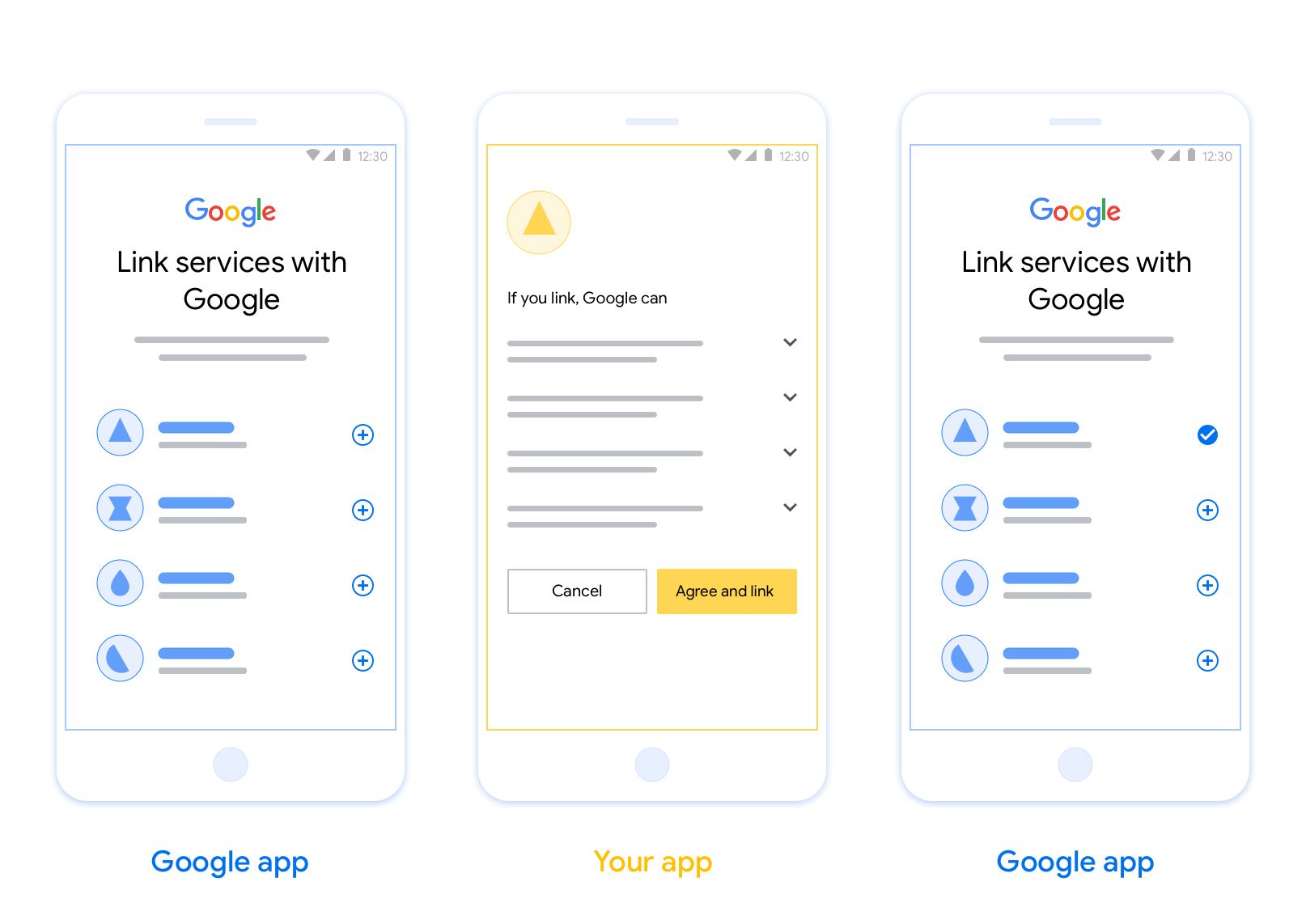
การลิงก์ App Flip ที่ใช้ OAuth (App Flip) ช่วยให้ผู้ใช้ลิงก์บัญชีในระบบการตรวจสอบสิทธิ์กับบัญชี Google ได้อย่างรวดเร็วและง่ายดาย หากติดตั้งแอปในโทรศัพท์ของผู้ใช้ขณะเริ่มกระบวนการลิงก์บัญชี ผู้ใช้จะเปลี่ยนไปใช้แอปเพื่อรับการให้สิทธิ์จากผู้ใช้ได้อย่างราบรื่น
แนวทางนี้ช่วยให้กระบวนการลิงก์เร็วและง่ายขึ้น เนื่องจากผู้ใช้ไม่ต้องป้อนชื่อผู้ใช้และรหัสผ่านอีกครั้งเพื่อตรวจสอบสิทธิ์ แต่ App Flip จะใช้ข้อมูลเข้าสู่ระบบจากบัญชีของผู้ใช้ในแอปแทน เมื่อผู้ใช้ลิงก์บัญชี Google กับแอปแล้ว ก็จะใช้ประโยชน์จากการผสานรวมที่คุณพัฒนาขึ้นได้
คุณสามารถตั้งค่า App Flip สำหรับทั้งแอป iOS และ Android
ข้อกำหนด
คุณต้องปฏิบัติตามข้อกำหนดต่อไปนี้เพื่อใช้ App Flip
- คุณต้องมีแอป Android หรือ iOS
- คุณต้องเป็นเจ้าของ จัดการ และดูแลรักษาเซิร์ฟเวอร์ OAuth 2.0 ที่รองรับขั้นตอนการใช้รหัสการให้สิทธิ์ OAuth 2.0
ดูข้อมูลเพิ่มเติมเกี่ยวกับขั้นตอนรหัสการให้สิทธิ์สำหรับการลิงก์ OAuth ได้ที่ หัวข้อการติดตั้งใช้งานเซิร์ฟเวอร์ OAuth 2.0
ดูวิธีการกำหนดค่า App Flip สำหรับการผสานรวม ได้ที่หัวข้อ App Flip ที่อิงตาม OAuth App Flip