

Setiap integrasi Cloud-to-cloud harus menyertakan mekanisme untuk mengautentikasi pengguna.
Autentikasi memungkinkan Anda menautkan Akun Google pengguna dengan akun pengguna di sistem autentikasi Anda. Hal ini memungkinkan Anda mengidentifikasi pengguna saat pemenuhan Anda menerima intent smart home. Smart home Google hanya mendukung OAuth dengan alur kode otorisasi.
Setelah memiliki penerapan OAuth 2.0, Anda dapat secara opsional mengonfigurasi App Flip berbasis OAuth, yang memungkinkan pengguna menautkan akun mereka dengan lancar dari aplikasi seluler Anda ke Akun Google mereka. Anda juga dapat menggunakan Deep linking untuk mengarahkan pengguna ke alur penautan dari aplikasi atau situs produk Anda.
OAuth
Untuk smart home, Anda harus menggunakan OAuth dengan alur kode otorisasi, yang mengharuskan Anda memiliki dua endpoint: endpoint otorisasi dan penukaran token.
Setelah Anda mengautentikasi pengguna, token akses OAuth 2.0 pihak ketiga pengguna akan dikirim di header otorisasi saat maksud smart home dikirim ke pemenuhan Anda. Semua pengguna harus melakukan penautan akun, karena informasi perangkat dikirim ke Google Assistant dengan maksud action.devices.SYNC, yang memerlukan penautan akun.
Integrasi Cloud-to-cloud Anda diharapkan mendukung beberapa pengguna Google yang terhubung ke akun pengguna yang sama (misalnya, saat pengguna memberikan akses kepada pengguna lain di rumah mereka). Jika layanan Anda tidak dapat mendukung koneksi multi-pengguna, layanan tersebut harus memberikan error pada saat penautan akun.
Untuk mengetahui petunjuk cara menyiapkan server OAuth 2.0 untuk integrasi Anda, lihat Menerapkan server OAuth 2.0 Anda.
Pengalihan Aplikasi berbasis OAuth
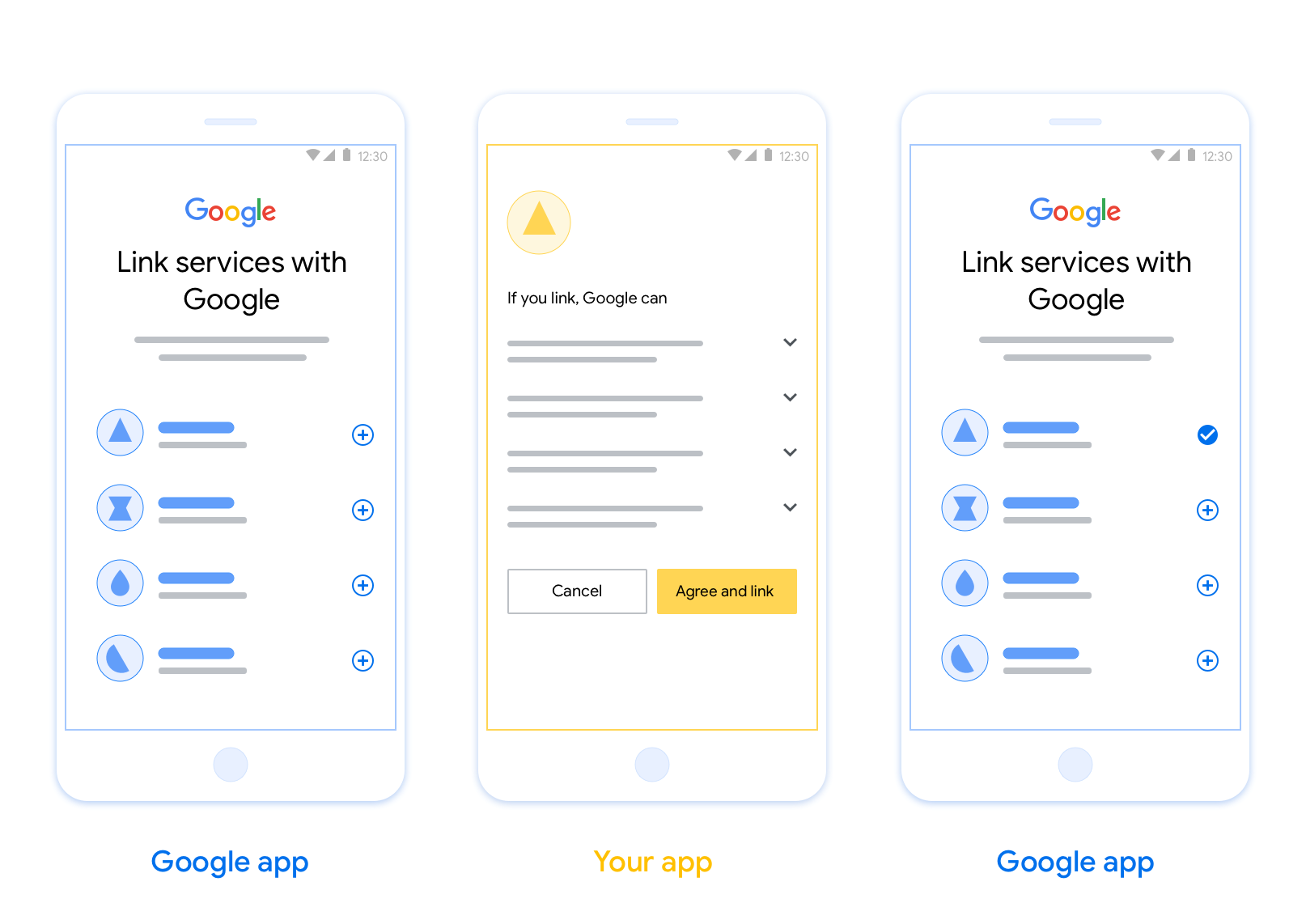
Penautan App Flip (App Flip) berbasis OAuth memungkinkan pengguna menautkan akun mereka di sistem autentikasi Anda ke Akun Google mereka dengan mudah dan cepat. Jika aplikasi Anda diinstal di ponsel pengguna ketika memulai proses penautan akun, aplikasi akan dialihkan dengan lancar ke aplikasi Anda untuk mendapatkan otorisasi pengguna.
Pendekatan ini memberikan proses penautan yang lebih cepat dan lebih mudah karena pengguna tidak perlu memasukkan kembali nama pengguna dan sandi untuk mengautentikasi; sebagai gantinya, App Flip memanfaatkan kredensial dari akun pengguna di aplikasi Anda. Setelah pengguna menautkan Akun Google-nya dengan aplikasi Anda, mereka dapat memanfaatkan integrasi apa pun yang telah Anda kembangkan.
Anda dapat menyiapkan App Flip untuk aplikasi iOS dan Android.
Persyaratan
Untuk menerapkan Balik Aplikasi, Anda harus memenuhi persyaratan berikut:
- Anda harus memiliki aplikasi Android atau iOS.
- Anda harus memiliki, mengelola, dan memelihara server OAuth 2.0 yang mendukung alur kode otorisasi OAuth 2.0.
Untuk mengetahui informasi selengkapnya tentang alur kode otorisasi penautan OAuth, lihat Menerapkan server OAuth 2.0 Anda.
Untuk mengetahui petunjuk cara mengonfigurasi App Flip untuk integrasi Anda, lihat App Flip berbasis OAuth.