
Some capabilities of the Home APIs for iOS vary depending on the state of network connectivity and the presence of a hub.
In discussing connectivity, we use the following terms.
To describe how a controller connects to a Matter device:
- Local refers to a situation where a user is running a controller such as Google Home app (GHA) or a third-party app on the same Wi-Fi network as the device (in other words, when they're in their home).
- Remote means that the user is either:
- Running a controller such as GHA or a third-party app on a separate Wi-Fi network (in other words, when they're away from home or
- Using Google Home for web.
To describe the state of a device in relation to the local network and the cloud:
- Online means the device is present on the local network and connected to the internet.
- Offline means the device is disconnected from both the local network and the internet. It may be powered off, disconnected, misconfigured, or missing entirely.
- Local-only means the device is present on the local network but isn't connected to the internet.
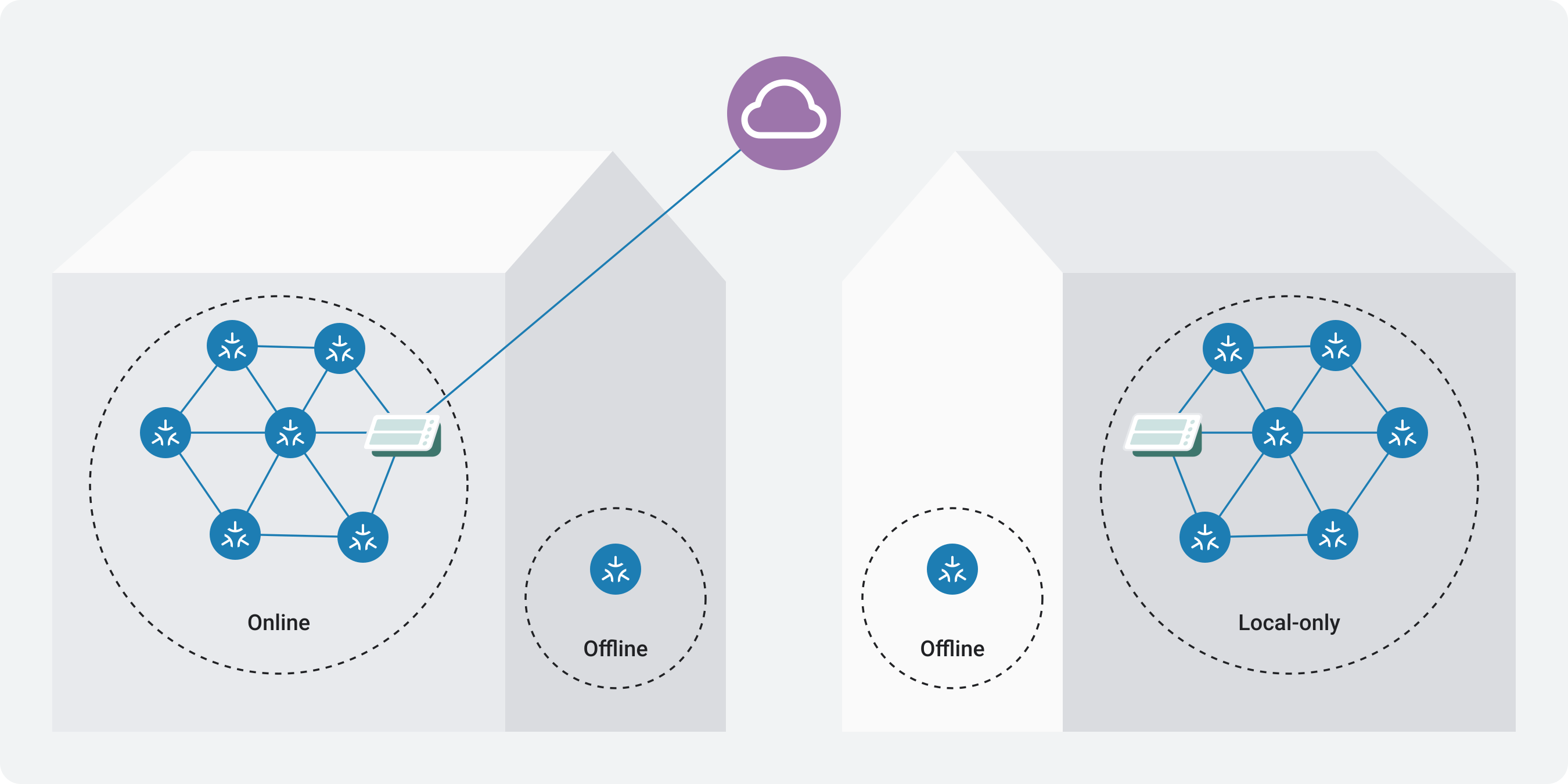
Three states describe the connectivity state of a device in the context of controlling it with a mobile app:
| Connectivity State | Description | Hub Status | Notes |
|---|---|---|---|
ONLINE-PEER |
The app communicates with the Matter device locally through a local hub or border router on the same network. | Either Online or Local-only | This is the expected state for hub-supported features when the user is in their home. |
ONLINE-REMOTE |
The app controls the Matter device from outside the home over the internet, routing commands securely through a cloud-connected local hub. | Online | This is the expected state when the user isn't home. |
ONLINE-DIRECT |
The app connects to the Matter device directly over the local network (for example, direct Wi-Fi or Thread link), not through a hub. | Any | If the hub is offline, only direct control is possible, and neither local execution of automations nor remote control are available. |
Table 2 and Table 3 indicate which use cases work under different conditions for different types of devices.
| Use Case | Matter Device Type | Cloud Device Type | ||
|---|---|---|---|---|
| Local | Remote | Local | Remote | |
| Commission and add device | n/a | |||
| Add device | n/a | n/a | ||
| View device state | ||||
| Control device | ||||
| Create automation with device | ||||
| Manually run automation with device | ||||
| Starter-triggered automation with device | ||||
| View camera local media stream | n/a | n/a | ||
| Use Case | Matter Device Type | Cloud Device Type | ||
|---|---|---|---|---|
| Local | Remote | Local | Remote | |
| Commission and add device | ||||
| Add device | n/a | n/a | ||
| View device state | ||||
| Control device | ||||
| Create automation with device | ||||
| Manually run automation with device | ||||
| Starter-triggered automation with device | 1 | 1 | n/a | n/a |
| Assign device to different room | ||||
| Remove device | ||||
| View camera local media stream | n/a | n/a | ||
[1]While the hub is local-only, a starter-triggered automation runs only if it is eligible for local execution and Google Home synced it from the cloud to the hub before the hub lost cloud connectivity. Automations created or edited while the hub is local-only take effect after it reconnects to the cloud. If the hub reboots while local-only, local execution resumes only after the hub reconnects to the cloud. Every device the automation uses must be locally reachable from the hub. Devices that are offline locally, or reached through another hub may not work. See Local automation execution.
Device groups
ADeviceGroup reports
aggregated connectivity across the traits on its supported parts through
group.sourceConnectivity.connectivityState using
ConnectivityState.
The Google Home cloud doesn't track member-device connectivity on group parts.
When cloud connectivity is available, the cloud provides an online fallback
route for the traits on a group's supported parts even if member devices are
offline. To check individual device status while connected to the cloud,
check connectivity on the member
HomeDevice instances directly. When cloud connectivity is unavailable,
group.sourceConnectivity.connectivityState reflects local
Matter reachability across the group's supported parts:
| Device group connectivity state | Description |
|---|---|
.online
|
All traits across the group's supported parts have an active route,
either locally (at least one local Matter member
device backs each trait) or through the cloud. Because the cloud
doesn't track member connectivity on group parts, a group with
supported parts reports
.online
whenever cloud connectivity is available, even if member devices are
offline.
|
.partiallyOnline
|
At least one trait across the group's supported parts is reachable
locally, while one or more other traits on the group's parts are
offline or unknown. For example, when internet connectivity is
unavailable, an online Matter device keeps its
supported group traits online locally while traits backed only by
unreachable or cloud-based devices are offline. Represent a group with
.partiallyOnline
connectivity to the user as online.
|
.offline
|
All traits across the group's supported parts are offline. This occurs when cloud connectivity is unavailable and no local Matter member devices are reachable for any of the group's traits. |
.unknown
|
Connectivity hasn't been determined yet, the group's parts contain only
.unknown and .offline
traits, or the group has no supported parts.
|
Network and hub connectivity affect device group operations as follows:
- When a home hub and the group's member Matter devices
are reachable on the local network, commands sent to a
DeviceGrouppart are expanded and dispatched locally without requiring internet connectivity. - Group management operations, such as creating, renaming, or deleting a group, or adding and removing member devices, require cloud connectivity.
- Automations that target a
DeviceGroupfollow the same hub and cloud requirements as individual devices in Table 1 and Table 2.
For more details on observing group parts and connectivity, see Monitor group parts and connectivity.
Troubleshooting
The following table enumerates how to address issues arising in various hub-related scenarios:
| Scenario | Expected behavior | Recommended User Action | ||
|---|---|---|---|---|
| Matter device state | Hub state | Device Control | Automation | |
| ONLINE-PEER or ONLINE-REMOTE | ONLINE (only one valid state) | No remediation action required. | ||
| ONLINE-DIRECT | No hub | Add a hub to the structure and ensure it's on the Wi-Fi network. | ||
| ONLINE-DIRECT | ONLINE | Configure the hub to use the same Wi-Fi network used by the phone. Alternatively, add a new hub to the structure and ensure it's on the Wi-Fi network. | ||
| ONLINE-DIRECT | OFFLINE | Ensure the hub is plugged in. | ||
| OFFLINE | No hub |
|
||
| OFFLINE | ONLINE | Ensure the device is plugged in. | ||
| OFFLINE | OFFLINE | Ensure the hub is plugged in. | ||