

應用程式可透過 Commissioning API 委託:
- 您的網路和 Google 網路。
- 僅限 Google 網狀架構。
Matter 裝置的調試方式
你可以透過下列方式啟動授權程序:
直接在應用程式中要求授權
直接在應用程式中要求委任,可透過應用程式中的按鈕觸發,並可透過兩種方式完成:
單一布料
如要申請委託:
在活動中初始化
ActivityResultLauncher。如果使用者在 Google Fabric 上委託裝置,結果可能會包含使用者在委託時指派給裝置的名稱。private val commissioningLauncher = registerForActivityResult(StartIntentSenderForResult()) { result -> val resultCode = result.resultCode if (resultCode == RESULT_OK) { Log.i("CommissioningActivity", "Commissioning success") val deviceName = CommissioningResult.fromIntentSenderResult(result.resultCode, result.data).deviceName } else { Log.i("CommissioningActivity", "Commissioning failed") } }建構
CommissioningRequest(包括收到的酬載資料),並使用setStoreToGoogleFabric設定將裝置委託給 Google Fabric 的選項:val commissioningRequest = CommissioningRequest.builder() .setOnboardingPayload(payload) .setStoreToGoogleFabric(true) // set all other options that you care about .build()如要將裝置委託給 Google 結構和自己的結構,請在
CommissioningRequest中使用setCommissioningService設定委託服務。使用
CommissioningClient執行個體開始偵測:commissioningClient .commissionDevice(commissioningRequest) .addOnSuccessListener { result -> Log.i("CommissioningActivity", "Commissioning success") _commissioningIntentSender.postValue(result) } .addOnFailureListener { error -> Log.i("CommissioningActivity", "Commissioning failed") }其中
_commissioningIntentSender的定義如下:private val _commissioningIntentSender = MutableLiveData<IntentSender?>() val commissioningIntentSender: LiveData<IntentSender?> get() = _commissioningIntentSenderCommissioningClient傳回意圖傳送端後,請啟動傳送端:commissioningIntentSender.observe(this) { sender -> if (sender != null) { commissioningLauncher.launch(IntentSenderRequest.Builder(sender).build()) } }
多個 Fabric (多位管理員)
如需在裝置上設定多個 Matter 結構,請參閱「Android 上的 Commissioning API 多管理員」。
Matter 啟用進入點,用於快速配對或 QR code 掃描 (僅限 Android)
在 Android 上,可以透過兩種方式使用快速配對或 QR code 要求委任:
單一布料
使用 ACTION_START_COMMISSIONING 意圖篩選器,即可為應用程式提供完整的委任功能,不需要 GHA。委託給 Google 結構時,這包括允許使用者為裝置指派名稱。
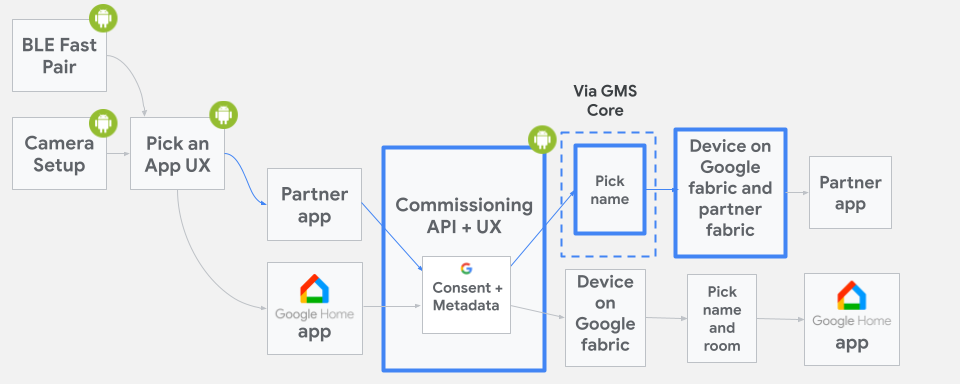
ACTION_START_COMMISSIONING 的委任流程如要表示支援 Google Fabric 委任,請在 AndroidManifest.xml 檔案中,將下列 intent-filter 新增至所選活動宣告:
<intent-filter>
<action android:name="com.google.android.gms.home.matter.ACTION_START_COMMISSIONING" />
<category android:name="android.intent.category.DEFAULT" />
</intent-filter>
intent-filter 可用於將應用程式加入 Commissioning API 應用程式挑選器中的建議 Matter 應用程式清單。如果您的應用程式不在建議應用程式之列,則會顯示在「Choose other app」選項中。
使用者選取應用程式後,應用程式就會啟動,並透過 ACTION_START_COMMISSIONING 意圖導向所選活動。
多個 Fabric (多位管理員)
您也可以在多管理員情境中使用 FastPair 流程。詳情請參閱「Android 上的 Commissioning API 多管理員」。
處理傳入的意圖
活動啟動後,應檢查現有的 ACTION_START_COMMISSIONING 意圖,並擷取酬載:
override fun onCreate(savedInstanceState: Bundle?) {
super.onCreate(savedInstanceState)
val payload = if (Matter.ACTION_START_COMMISSIONING.equals(intent.getAction())) {
intent.getStringExtra(Matter.EXTRA_ONBOARDING_PAYLOAD)
} else {
null
}
val commissioningRequest = CommissioningRequest.builder()
        .setOnboardingPayload(payload)
        .setStoreToGoogleFabric(true)
  // set all other options that you care about
        .build()
startCommissioning(commissioningRequest)
}
如果酬載值不是 null,表示使用者已掃描裝置 QR code 或輸入配對金鑰。null 酬載值「不」代表應取消委任。
隱藏可佣金探索通知

根據預設,Android 上的 Google Play services 會使用「半頁」通知,覆蓋行動裝置螢幕的下半部,主動向使用者指出附近有可委任的 Matter 裝置。
為避免應用程式在前景執行時受到干擾,您可以呼叫 suppressHalfSheetNotification() 方法來隱藏這些通知。詳情請參閱 API 說明文件。
如果應用程式在前景執行超過 15 分鐘,這個 API 啟用的抑制功能就會逾時。如要在逾時後重新啟用抑制功能,請再次呼叫 suppressHalfSheetNotification(),否則系統會開始顯示半頁通知。
如何與 Google 共用 Fabric 上的 Matter 裝置?
Google 強烈建議您使用 Commissioning API,將已在自己 Fabric 上設定的裝置,分享到 Google Fabric。Share API 有其限制,應保留給其他用途。
為什麼要使用 Commissioning API,而不是 Share API?
Commissioning API 可讓您直接觸發與 Google Fabric 共用裝置,這是可行的首選方法。如果使用 Share API,使用者需要執行更多步驟。舉例來說,使用者必須安裝 GHA,並在過程中選取 GHA,才能確保成功。
如要使用 Commissioning API,請開啟委任視窗並呼叫 Commissioning API,詳情請參閱「如何使用 Commissioning API 做為次要 Matter 委任者」。
何時應使用 Share API?
您可以使用 Share API,讓使用者選擇符合資格的應用程式,與其他 Matter 生態系統共用裝置。