

部分 Matter 裝置是由多個端點組成,且裝置類型相同。其他 Matter 裝置具有階層結構,端點會巢狀內嵌在其他端點中。在 Home API 中,這兩種裝置都稱為「多部分裝置」。
平面式表示法
在 1.8 版的 Home API 推出前,Home API 會將多部分裝置視為一組不相關的獨立裝置。這稱為「平面」表示法。
舉例來說,如果單一牆面控制面板裝置有四個開關,Home API 會將其視為四個不同的不相關裝置。冰箱等階層式Matter裝置可能會在 Home API 中表示為一組裝置,每個裝置對應一個端點。
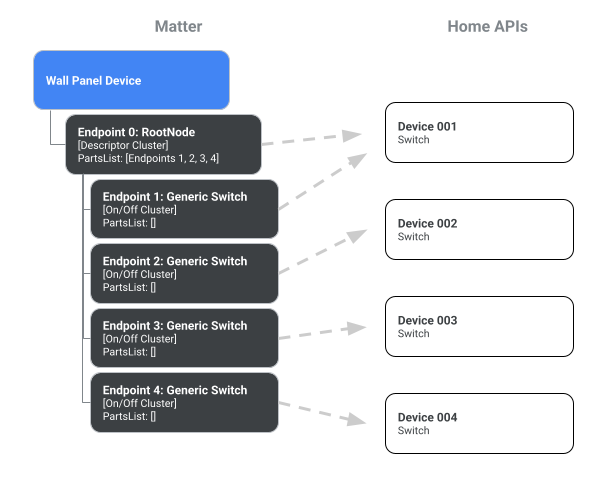
4 個開關的牆面面板平面圖。
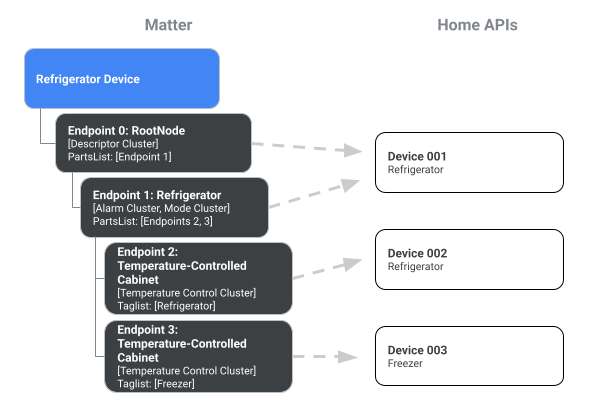
冰箱的平面圖
多部分表示法
從 Home API 1.8 版開始,多零件裝置在 API 中可以表示為單一裝置。如要啟用這項行為,請在 Structure、Room 或 HomeManager 上呼叫 devices() 方法,並將 enableMultipartDevices 參數設為 true:
var multipartDevice = structure.devices(enableMultipartDevices = multipartEnabled)
var multipartDevice = multipartDevices.list().filter{ device ->  device.has(PowerStrip)}
下圖說明 enableMultipartDevices 選項如何影響 Home API 中多部分裝置的表示方式:
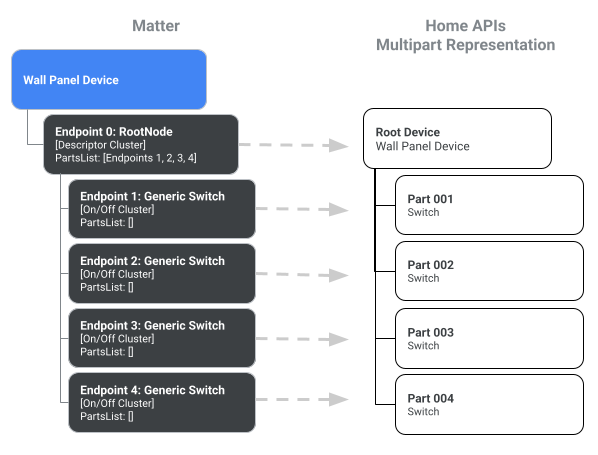
牆板的多部分表示法。
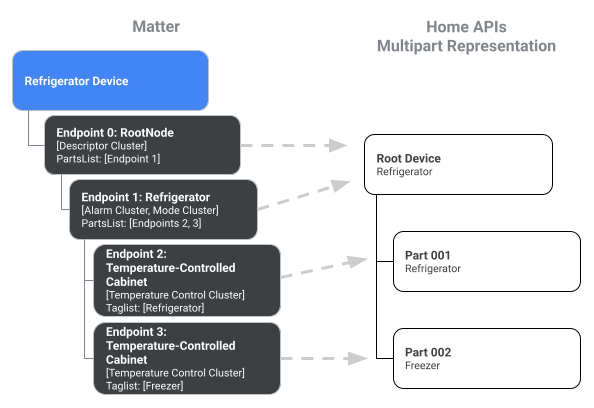
冰箱的多部分表示法。
如要取得平面表示法,您可以省略 enableMultipartDevices 參數,或將該參數設為 false。
操作多部分裝置
在多部分裝置中,裝置類型的每個元件執行個體都稱為「零件」。
您可以使用裝置類型或 Matter 語意標記,直接在父項裝置上存取零件,或以階層式方式存取零件。語意標記是在 Home API 中透過 DescriptorTrait.SemanticTagStruct 實作。
DeviceType 抽象類別會實作 HasParts 介面,讓開發人員透過 parts 屬性和 part() 方法瀏覽裝置樹狀結構。每個零件執行個體也會實作 HasParts 介面,因此在零件上呼叫 parts() 會產生零個或多個子零件的清單。
以下範例說明如何存取多重切換裝置的各個部分:
val device =
      homeManager
        .devices(enableMultipartDevices = true)
        .itemFlow(Id(MULTI_SWITCH_DEVICE))
        .first()

// Here at top-level, we are using the homeDevice.parts() API to access flow of
// all the switches. Then we get the part ids.
val partIds =
      device
        .parts()
        .map { parts ->
          parts.filter { it.has(Switch) }.mapNotNull { it.metadata.partId }
        }
        .first()
        .toSet()
下一個範例說明如何存取冰箱裝置的零件:
val rootDevice = homeManager.devices(true).itemFlow(Id("device@uuid1"))

// On the top level, HomeDevice provides both plural (parts)
// and singular (part) APIs.
// The parts() API returns all the parts accessible from the top level,
// including Endpoint 0 and its children.
val childParts = rootDevice.parts().first()
// childParts contain (EP0 as RootNode, EP1 as Refrigerator)

// The singular part() API accepts DeviceType and tags (optional).
val refrigerator = rootDevice.part(Refrigerator).first()

// Get the refrigerator device which in this case is just device@uuid1
val refrigeratorDevice = homeManager.devices(false).itemFlow(refrigerator.metadata.partId.deviceId)

// DeviceType uses a synchronous API for providing access to parts
val cabinets = refrigerator.parts  // [EP2, EP3]

// Get the HomeDevice for these cabinets (device@uuid2 and device@uuid3)
val cabinetDeviceIds = cabinets.map { it.metadata.partId }

// Now use the devices API with enableMultipartDevices = false.
val cabinetDevices = homeManager.devices(false)
    .map { devices ->
devices.filter { it.id in cabinetDeviceIds }
}.first()