

部分 Matter 裝置是由多個相同類型的端點組成。其他 Matter 裝置則採用階層式結構,端點會以巢狀結構嵌入其他端點。在 Home API 中,這兩種裝置都稱為多部分裝置。
平面表示法
在 Home API 1.8 版之前,Home API 會將多組件裝置視為一組獨立、不相關的裝置。這稱為「平面」表示法。
舉例來說,在 Home API 中,一個具有四個開關的牆面面板裝置會顯示為四個不同且不相關的裝置。而階層式 Matter 裝置 (例如冰箱) 在 Home API 中可能會以一組裝置表示,每個裝置對應一個端點。
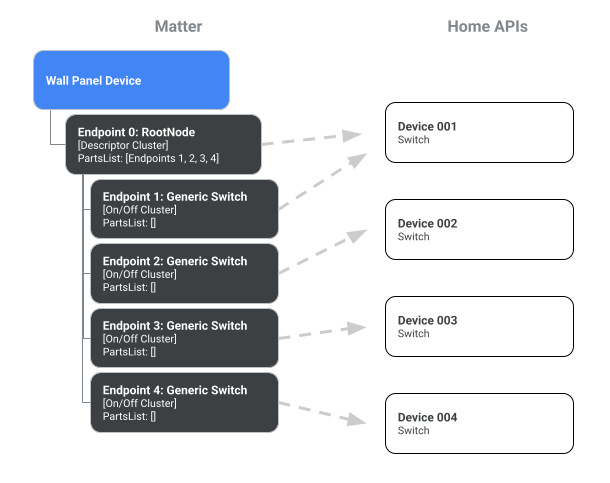
4 開關牆面板的平面圖。
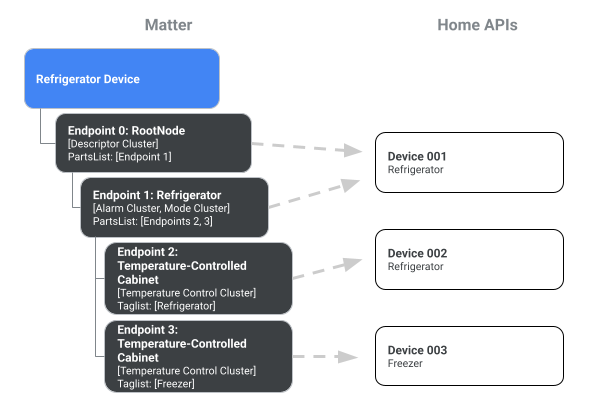
冰箱的平面圖
多部分表示法
從 Home API 1.8 版開始,多組件裝置可在 API 中表示為單一裝置。如要啟用這項行為,請在 Structure、Room 或 HomeManager 上呼叫 devices() 方法,並將 enableMultipartDevices 參數設為 true:
var multipartDevice = structure.devices(enableMultipartDevices = multipartEnabled)
var multipartDevice = multipartDevices.list().filter{ device ->  device.has(PowerStrip)}
下圖說明 enableMultipartDevices 選項如何影響 Home API 中多部分裝置的表示法:
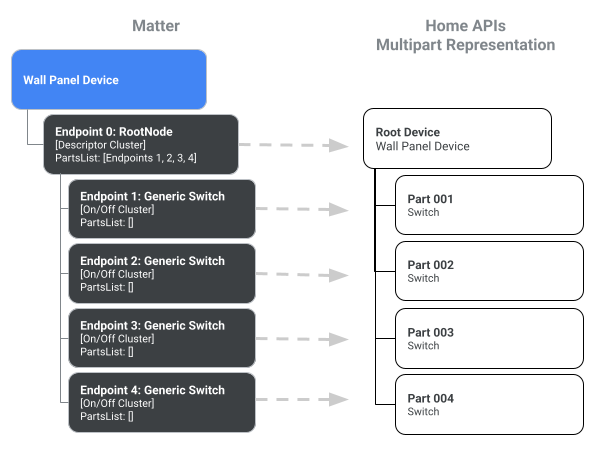
牆板的多部分表示法。
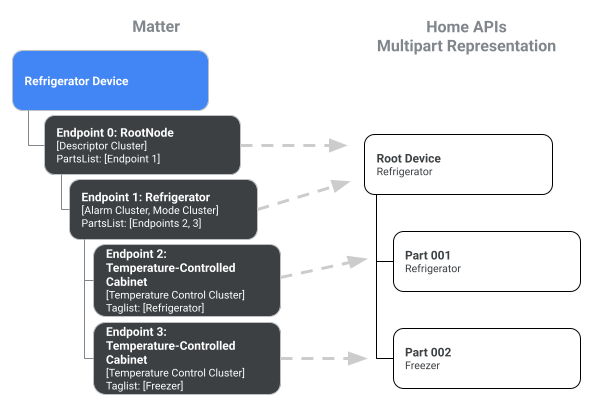
冰箱的多部分表示法。
您隨時可以省略 enableMultipartDevices 參數,或將其設為 false,以取得平面表示法。
操作多部分裝置
在多部分裝置中,裝置類型的每個元件執行個體稱為「部分」。
您可以使用裝置類型或 Matter 語意標記,直接在父項裝置或零件上以階層方式存取零件。語意標記是在 Home API 中使用 DescriptorTrait.SemanticTagStruct 實作。
DeviceType 抽象類別會實作 HasParts 介面,讓開發人員透過 parts 屬性和 part() 方法瀏覽裝置樹狀架構。每個部分例項也會實作 HasParts 介面,因此在部分上呼叫 parts() 會產生零或多個子部分的清單。
以下範例說明如何存取多切換工具裝置的各個部分:
val device =
      homeManager
        .devices(enableMultipartDevices = true)
        .itemFlow(Id(MULTI_SWITCH_DEVICE))
        .first()

// Here at top-level, we are using the homeDevice.parts() API to access flow of
// all the switches. Then we get the part ids.
val partIds =
      device
        .parts()
        .map { parts ->
          parts.filter { it.has(Switch) }.mapNotNull { it.metadata.partId }
        }
        .first()
        .toSet()
下一個範例說明如何存取冰箱裝置的各個部分:
val rootDevice = homeManager.devices(true).itemFlow(Id("device@uuid1"))

// On the top level, HomeDevice provides both plural (parts)
// and singular (part) APIs.
// The parts() API returns all the parts accessible from the top level,
// including Endpoint 0 and its children.
val childParts = rootDevice.parts().first()
// childParts contain (EP0 as RootNode, EP1 as Refrigerator)

// The singular part() API accepts DeviceType and tags (optional).
val refrigerator = rootDevice.part(Refrigerator).first()

// Get the refrigerator device which in this case is just device@uuid1
val refrigeratorDevice = homeManager.devices(false).itemFlow(refrigerator.metadata.partId.deviceId)

// DeviceType uses a synchronous API for providing access to parts
val cabinets = refrigerator.parts  // [EP2, EP3]

// Get the HomeDevice for these cabinets (device@uuid2 and device@uuid3)
val cabinetDeviceIds = cabinets.map { it.metadata.partId }

// Now use the devices API with enableMultipartDevices = false.
val cabinetDevices = homeManager.devices(false)
    .map { devices ->
devices.filter { it.id in cabinetDeviceIds }
}.first()