

อุปกรณ์ Matter บางรายการประกอบด้วยปลายทางหลายรายการที่มี อุปกรณ์ประเภทเดียวกัน ส่วนอุปกรณ์ Matter อื่นๆ เป็นแบบ ลำดับชั้น โดยมีปลายทางซ้อนอยู่ในปลายทางอื่นๆ ใน Home API ทั้งอุปกรณ์ทั้ง 2 ประเภทนี้เรียกว่า อุปกรณ์หลายส่วน
การแสดงแบบราบ
ก่อนที่จะมีการเปิดตัว Home API เวอร์ชัน 1.8 นั้น Home API จะแสดงอุปกรณ์หลายส่วนเป็นชุดของอุปกรณ์ที่แยกกันและไม่เกี่ยวข้องกัน ซึ่งเรียกว่าการแสดงแบบ ราบ
ตัวอย่างเช่น อุปกรณ์แผงติดผนังแบบสวิตช์เดียวที่มีสวิตช์ 4 ตัวจะปรากฏใน Home API เป็นอุปกรณ์ 4 ตัวที่แตกต่างกันและไม่เกี่ยวข้องกัน และอุปกรณ์แบบลำดับชั้น Matter เช่น ตู้เย็น อาจแสดงใน Home API เป็นชุดของอุปกรณ์ ซึ่งแต่ละอุปกรณ์จะสอดคล้องกับปลายทาง 1 รายการ
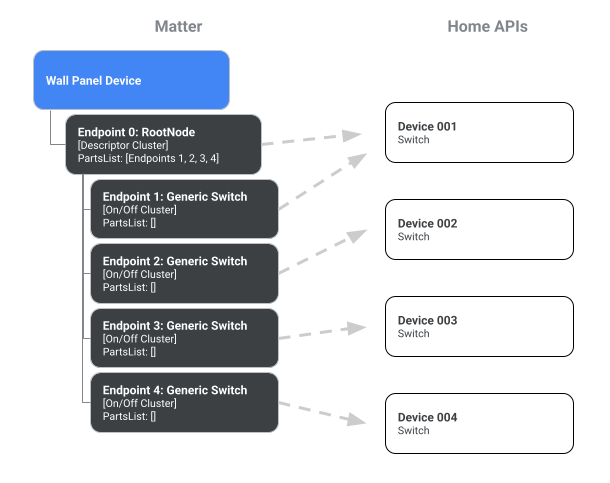
การแสดงแบบราบของแผงติดผนังแบบ 4 สวิตช์
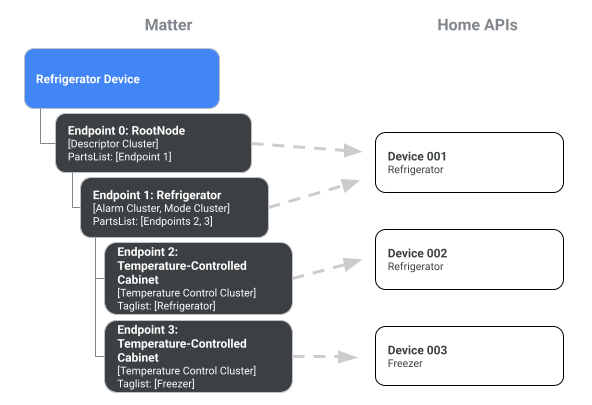
การแสดงแบบราบของตู้เย็น
การแสดงแบบหลายส่วน
ตั้งแต่ Home API เวอร์ชัน 1.8 เป็นต้นไป อุปกรณ์หลายส่วนสามารถแสดงใน API เป็นอุปกรณ์เดียวได้ หากต้องการเปิดใช้ลักษณะการทำงานนี้ ให้เรียกใช้เมธอด devices() ใน Structure, Room หรือ HomeManager แล้วตั้งค่าพารามิเตอร์ enableMultipartDevices เป็น true
var multipartDevice = structure.devices(enableMultipartDevices = multipartEnabled)
var multipartDevice = multipartDevices.list().filter{ device ->  device.has(PowerStrip)}
แผนภาพต่อไปนี้แสดงให้เห็นว่าตัวเลือก enableMultipartDevices ส่งผลต่อการแสดงอุปกรณ์หลายส่วนใน Home API อย่างไร
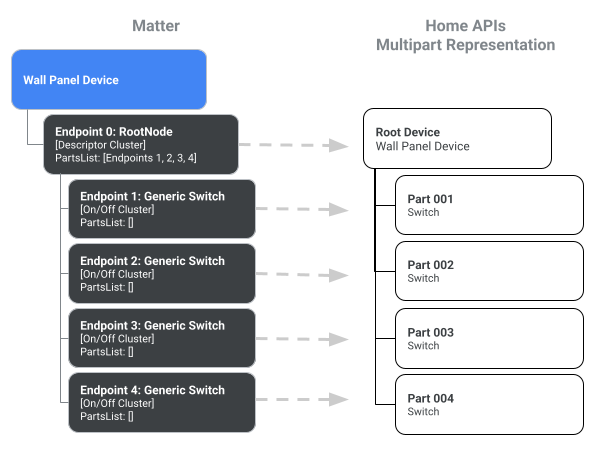
การแสดงแบบหลายส่วนของแผงติดผนัง
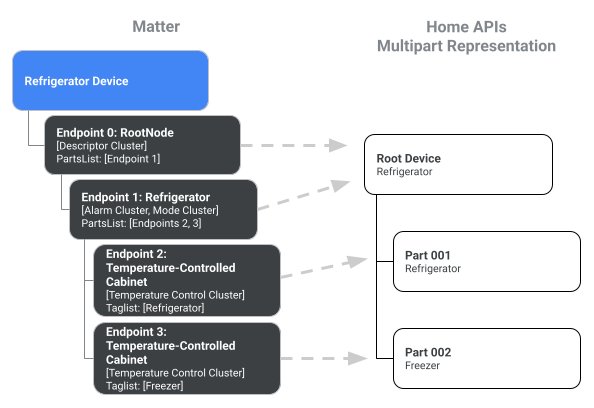
การแสดงแบบหลายส่วนของตู้เย็น
คุณมีตัวเลือกในการรับการแสดงแบบราบเสมอโดยละเว้นพารามิเตอร์ enableMultipartDevices หรือตั้งค่าเป็น false
สำรวจอุปกรณ์หลายส่วน
ภายในอุปกรณ์หลายส่วน อินสแตนซ์คอมโพเนนต์แต่ละรายการของประเภทอุปกรณ์จะเรียกว่า ส่วน
คุณสามารถเข้าถึงส่วนต่างๆ ได้โดยตรงในอุปกรณ์หลักหรือส่วนต่างๆ ในลักษณะลำดับชั้น
โดยใช้ประเภทอุปกรณ์หรือแท็กMatterความหมาย
เราได้ใช้แท็กความหมายใน Home API ด้วย
DescriptorTrait.SemanticTagStruct
คลาสแอบสแตรกต์ DeviceType ใช้อินเทอร์เฟซ HasParts ซึ่งช่วยให้นักพัฒนาซอฟต์แวร์สำรวจแผนผังอุปกรณ์ผ่านพร็อพเพอร์ตี้ parts และเมธอด part() ได้ อินสแตนซ์ส่วนแต่ละรายการยังใช้อินเทอร์เฟซ HasParts ด้วย ดังนั้นการเรียกใช้ parts() ในส่วนหนึ่งจะสร้างรายการส่วนย่อยตั้งแต่ 0 รายการขึ้นไป
ตัวอย่างต่อไปนี้แสดงวิธีเข้าถึงส่วนต่างๆ ของอุปกรณ์แบบหลายสวิตช์
val device =
      homeManager
        .devices(enableMultipartDevices = true)
        .itemFlow(Id(MULTI_SWITCH_DEVICE))
        .first()

// Here at top-level, we are using the homeDevice.parts() API to access flow of
// all the switches. Then we get the part ids.
val partIds =
      device
        .parts()
        .map { parts ->
          parts.filter { it.has(Switch) }.mapNotNull { it.metadata.partId }
        }
        .first()
        .toSet()
ตัวอย่างถัดไปแสดงวิธีเข้าถึงส่วนต่างๆ ของอุปกรณ์ตู้เย็น
val rootDevice = homeManager.devices(true).itemFlow(Id("device@uuid1"))

// On the top level, HomeDevice provides both plural (parts)
// and singular (part) APIs.
// The parts() API returns all the parts accessible from the top level,
// including Endpoint 0 and its children.
val childParts = rootDevice.parts().first()
// childParts contain (EP0 as RootNode, EP1 as Refrigerator)

// The singular part() API accepts DeviceType and tags (optional).
val refrigerator = rootDevice.part(Refrigerator).first()

// Get the refrigerator device which in this case is just device@uuid1
val refrigeratorDevice = homeManager.devices(false).itemFlow(refrigerator.metadata.partId.deviceId)

// DeviceType uses a synchronous API for providing access to parts
val cabinets = refrigerator.parts  // [EP2, EP3]

// Get the HomeDevice for these cabinets (device@uuid2 and device@uuid3)
val cabinetDeviceIds = cabinets.map { it.metadata.partId }

// Now use the devices API with enableMultipartDevices = false.
val cabinetDevices = homeManager.devices(false)
    .map { devices ->
devices.filter { it.id in cabinetDeviceIds }
}.first()