## Certification test type
Follow the steps in this section if you used the [**Certification**
test plan type](https://developers.home.google.com/matter/test#types_of_test_plans) for your Matter integration.
Certification test plans are specifically for Matter certification, and are
not editable.
Before submitting your Matter integration
for certification review, be sure the following steps are complete:
- **[Test Results](https://developers.home.google.com/matter/test/submit.md.txt) review** --- Validates
Google Home Test Suite results and any additional materials that
apply to the device certification.
**If the Matter device is a
[Matter Bridge](https://developers.home.google.com/matter/supported-devices.md.txt#bridges),
Test Suite results are required for all the devices
listed in the Connectivity Standards Alliance (Alliance) Certification document.**
- **[Company profile](https://developers.home.google.com/matter/project/profile.md.txt) review** --- Confirms the
accuracy of the company information. You cannot apply for
certification if you have not completed your company profile.
- **Policy review** --- Verifies that your integration complies with
[Google's policy](https://developers.home.google.com/policies.md.txt) guidelines.
- Upload the before and after [product images](https://developers.home.google.com/matter/integration/branding.md.txt) before creating a version.
- Your [Field Trial](https://developers.home.google.com/matter/field-trial/run.md.txt#stop_a_field_trial) needs to end before submitting a version for certification. Each Field Trial is conducted against a specific version of your integration, and the results of each Field Trial are associated with the respective version.
- Ensure you've completed commissioning tests for **Production users** (not just Developer and Field Trial users).
> [!IMPORTANT]
> **Important:** Make sure the software versions are the same versions used for the Alliance certification.
- If your integration includes **App info**, you may need to submit a video for
verification to expedite the certification review. Record commissioning your
device with your app using this process:
1. Fast pairing
2. Scanning QR code
3. Choosing your app from App Picker
4. Connecting your device on your app
5. Sharing your device from your app to the Google Home app (GHA)
- If your device supports [Cloud-to-cloud and
Matter](https://developers.home.google.com/matter/device-deduplication), provide videos
that show successful deduplication. The following commissioning flows should
be recorded:
- Commission using Cloud-to-cloud then
Matter:
1. Pair your device with Cloud-to-cloud
2. Show the device in GHA
3. Pair the same device again with Matter
4. Show the devices merging into one in GHA
- Commission using Matter then
Cloud-to-cloud:
1. Pair your device with Matter
2. Show the device in GHA
3. Pair the same device again with Cloud-to-cloud
4. Show the devices merging into one in GHA
- Show a sample SYNC response that captures the Matter
unique ID of the device.
Upload your videos using the
**Upload documentation**
button in Figure 1 when submitting
your integration.
### Submit your integration for certification
Once all reviews are complete, you can submit your integration
for certification.
> [!NOTE]
> **Note:** You can submit multiple versions for certification at the same time, but only one version can be live at any point in time.
[Go to the Developer Console](https://console.home.google.com)
1. Go to **Matter** \> **Certify**.
2. Any integrations that are ready for submission appear in the **Integrations for certification** section.
- If the status is **Not Ready** , click **View issues** to see the instructions on how to move forward.
3. In Figure 1, select the Test Suite results from the **Select test result** drop-down list to include in the certification process.
4. Create and upload a zip file (using the **Upload documentation** button in Figure 1) containing:  **Figure 1**: Documentation for Certification test type
- Your Field Trial results with responses in a non-editable spreadsheet, if applicable.
- A video of your app displayed on App Picker.
- Documentation that verifies your ownership of the PID, including the Alliance Certificate stating that your product is certified for Matter. [Click here for an example.](https://developers.home.google.com/static/matter/images/matter-certification.png)
5. Make sure all sections of the **Submit certification** page are completed and all required information has been uploaded.
6. Click **Submit** when ready.
Once submitted, your integration appears in the **Submitted for
Certification** section.
The certification review results will be sent to the email address provided in
the [Developer Contacts](https://developers.home.google.com/matter/projects/profile#contact_information) section.
Once your integration is certified, you can choose to launch your
integration immediately or later.
> [!NOTE]
> **Note:** Multiple versions can be certified at the same time for you to choose from or launch.
If the review was rejected, see
[Check Certification Status](https://developers.home.google.com/matter/certification/status.md.txt) for more
information.
## CSA Interop test type
> [!IMPORTANT]
> **Important:** Starting in 2026, we will be transitioning to using the Connectivity Standards Alliance (Alliance) Interop Test Lab results for certification. See the [Alliance Interop Test Lab transition](https://developers.home.google.com/matter/csa-interop-test-lab) page for more details.
Follow the steps in this section if you used the
[**CSA Interop** test plan type](https://developers.home.google.com/matter/test.md.txt#types_of_test_plans)
for your Matter integration. Alliance Interop test plans allow
you to skip the test stage in Google Home Developer Console and use your
Alliance Interop Test Lab results instead. This test option is
available for all supported device types, and it is required to achieve Aliro
certification for
[Aliro-compatible door locks](https://developers.home.google.com/matter/supported-devices.md.txt#door_locks). If you
selected a different test option for an Aliro door lock, you must create a new
integration version with the **CSA Interop test** option and resubmit.
Before submitting your Matter integration
for certification review, be sure the following steps are complete:
- **[Company profile](https://developers.home.google.com/matter/project/profile.md.txt) review** --- Confirms the
accuracy of the company information. You cannot apply for
certification if you have not completed your company profile.
- **Policy review** --- Verifies that your integration complies with
[Google's policy](https://developers.home.google.com/policies.md.txt) guidelines.
- Upload the before and after
[product images](https://developers.home.google.com/matter/integration/branding.md.txt) before creating a
version.
- Ensure you've completed commissioning tests for **Production users** (not
just Developer and Field Trial users).
> [!IMPORTANT]
> **Important:** Make sure the software versions are the same versions used for the Alliance certification.
### Submit your integration for certification
1. Go to **Matter** \> **Certify**.
2. Any integrations that are ready for submission appear in the **Integrations for certification** section.
- If the status is **Not Ready** , click **View issues** to see the instructions on how to move forward.
3. Create and upload (using the **Upload documentation** button in Figure 2) a zip file containing: 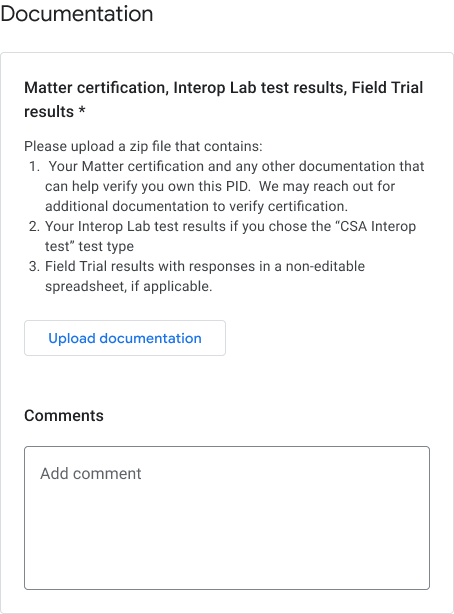 **Figure 2**: Documentation for CSA Interop test type
- Interop lab results.
- Documentation that verifies your ownership of the PID, including the Alliance Certificate stating that your product is certified for Matter. [Click here for an example.](https://developers.home.google.com/static/matter/images/matter-certification.png)
4. Make sure all sections of the **Submit certification** page are completed and all required information has been uploaded.
5. Click **Submit** when ready. Once submitted, your integration appears in the **Submitted for Certification** section.
The certification review results will be sent to the email address provided in
the [Developer Contacts](https://developers.home.google.com/matter/projects/profile#contact_information) section.
Once your integration is certified, you can choose to launch your
integration immediately or later.
> [!NOTE]
> **Note:** Multiple versions can be certified at the same time for you to choose from or launch.
If the review was rejected, see
[Check Certification Status](https://developers.home.google.com/matter/certification/status.md.txt) for more
information.
## Withdraw submission
Any integrations listed in the **Submitted for Certification**
section can be cancelled.
1. Select the integration version you would like to withdraw and click **Withdraw**.
2. In the confirmation dialog, click **Withdraw** to confirm.
After withdrawing, the withdrawn version is moved back to the
**Integrations for certification** section and the status changes
back to **Ready**.
## Console statuses
The following Console statuses are encountered in the Certification phase:
| **Section** | **Status** | **Description** | **Requirement** | **What to do next** |
|---|---|---|---|---|
| Integrations for certification | Ready | This version of the integration is ready to be submitted for certification review. | Alliance-issued vendor ID is used (not Test VID). Company profile has been submitted. | [Submit this version of the integration for certification review](https://developers.home.google.com/matter/certification/submit.md.txt#submit_your_integration_for_certification). |
| Integrations for certification | Not ready | This version of the integration didn't meet criteria. | Alliance-issued vendor ID is not used. Company profile has not been submitted. | 1. View issues that are listed in the console. 2. Fix issues or [create a new version](https://developers.home.google.com/matter/integration/versioning.md.txt#create) using a Alliance-issued vendor ID and an approved [Company Profile](https://developers.home.google.com/matter/project/profile.md.txt). 3. [Submit again for certification](https://developers.home.google.com/matter/certification/submit.md.txt#submit_your_integration_for_certification). |
| Submitted for certification | In review | This version of the integration is in certification review. | Successful submission. | Wait for approval. **or** [Withdraw the submission](https://developers.home.google.com/matter/certification/submit.md.txt#withdraw_submission) if desired. |
| Submitted for certification | Approved | The certification submission for this version of the integration was approved and can be launched. | - Certification disclaimer was agreed to. - Company profile is approved and live. - Product ID (PID) ownership was verified. | [Launch](https://developers.home.google.com/matter/launch.md.txt) or [schedule a launch](https://developers.home.google.com/matter/launch.md.txt#schedule) for this version of the integration. |
| Submitted for certification | Rejected | This version of the integration didn't meet certification criteria and can't be resubmitted. | Approval criteria weren't met. | View issues that are listed in the console. [Create a new version](https://developers.home.google.com/matter/integration/versioning.md.txt#create) that meets the approval criteria and [submit that version for certification](https://developers.home.google.com/matter/certification/submit.md.txt#submit_your_for_certification). **or** [Provide justification](https://developers.home.google.com/matter/test/submit.md.txt#justification_for_failed_tests) for failed certification tests, if applicable. |