> Documentation index: https://developers.home.google.com/cloud-to-cloud/llms.txt
 Ways to build
### **Cloud-to-cloud**
Let users control your cloud connected devices through the Google Home app and Google Assistant. Add a local control path for greater reliability. 
## Get started
Essential resources to kick off your project, including timelines and checklists. Get started
### [Account linking](http://developers.home.google.com/cloud-to-cloud/project/authorization.md.txt)
The Google smart home only supports OAuth with an authorization code flow. Get started
### [Create a Cloud-to-cloud integration](http://developers.home.google.com/cloud-to-cloud/project/create.md.txt)
Create a developer project and use one of our samples to quickly get started. Get started
### [Intent fulfillment](http://developers.home.google.com/cloud-to-cloud/integration/sync.md.txt)
Process the smart home intents and return responses that Google Assistant recognizes. Get started
### [Certify a Cloud-to-cloud integration](http://developers.home.google.com/cloud-to-cloud/certification.md.txt)
An overview of the process for certifying a Cloud-to-cloud integration.
## Overview
### Supports 80+ device types
Cloud is our most flexible integration, supporting more than 80 device types, including those devices not currently supported by Matter.
### Great for users of all types
Cloud-to-cloud enables control at home and remotely, even for new smart home users without a Matter controller like a Nest speaker, display or Wi-Fi.
### Best of both worlds
For developers building Matter devices, cloud-to-cloud can serve as a seamless fallback for users with or without a local controller. 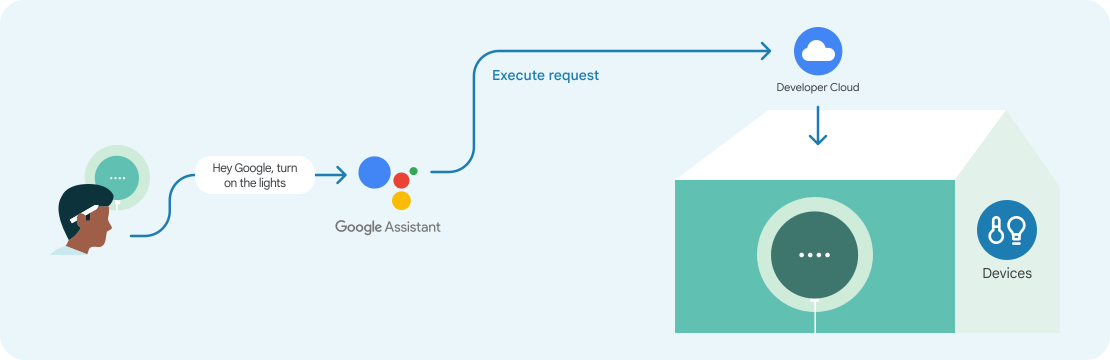
### Works everywhere Google does
Millions of users turn to Google Assistant every day for help. Learn how your apps \& content can help them get things done.
### Simple setup \& discovery
Implement features that make it simple for users to set up and connect your smart devices to Assistant.
### Works With Google Home badge
Devices labeled with the 'Works with Hey Google' badge, should provide robust functionality and a safe, reliable, and seamless experience for users. 
## Developer tools
### [Google Home Test Suite](http://developers.home.google.com/tools/test-suite.md.txt)
Test your smart home integration to ensure it meets launch requirements for Google's smart home ecosystem.
### [Google Home Extension for VS Code](http://developers.home.google.com/tools/vs-code.md.txt)
Get access to Google Assistant Simulator, Cloud Logging, and other tools to simplify your smart home development process.
### [Google Home Playground](http://developers.home.google.com/tools/home-playground.md.txt)
Simulate a smart home project by simulating a virtual home with configurable device types and traits.
## Resources
Codelab
### [Implement CameraStream with WebRTC](http://developers.home.google.com/codelabs/smarthome-webrtc)
Learn how to stream from a webcam to a Google Nest display device with the CameraStream trait and WebRTC. Tutorials
### [Request Sync](http://developers.home.google.com/cloud-to-cloud/integration/request-sync.md.txt)
Request the list of smart home devices that the user has connected and are available for use. Document
### [Report State](http://developers.home.google.com/cloud-to-cloud/integration/report-state.md.txt)
Learn how to proactively report the latest status of the user's device back to Google's Home Graph.
### Get updates straight to your inbox
Stay up-to-date on the latest news, features, and requirements from Google Home [Subscribe](https://services.google.com/fb/forms/GoogleSmartHomeSignup/)