The Google Home APIs for iOS provide a unified API surface to enable
developers to interact with the state of entities in a user's home. These
entities can describe devices and non-device information associated with a
user's structure and rooms.
The Home APIs define the following entities that a user can interact with:
- **Structures** represent a home that contains rooms and devices.
- **Rooms** are part of a structure and contain devices.
- **Device groups** are user-defined collections of devices within a structure.
- **Devices** implement traits containing attributes, conform to types, emit events, and respond to commands.
- **Automations** are part of a structure and use home metadata and devices to automate tasks in the home.
Figure 1 illustrates this architecture:
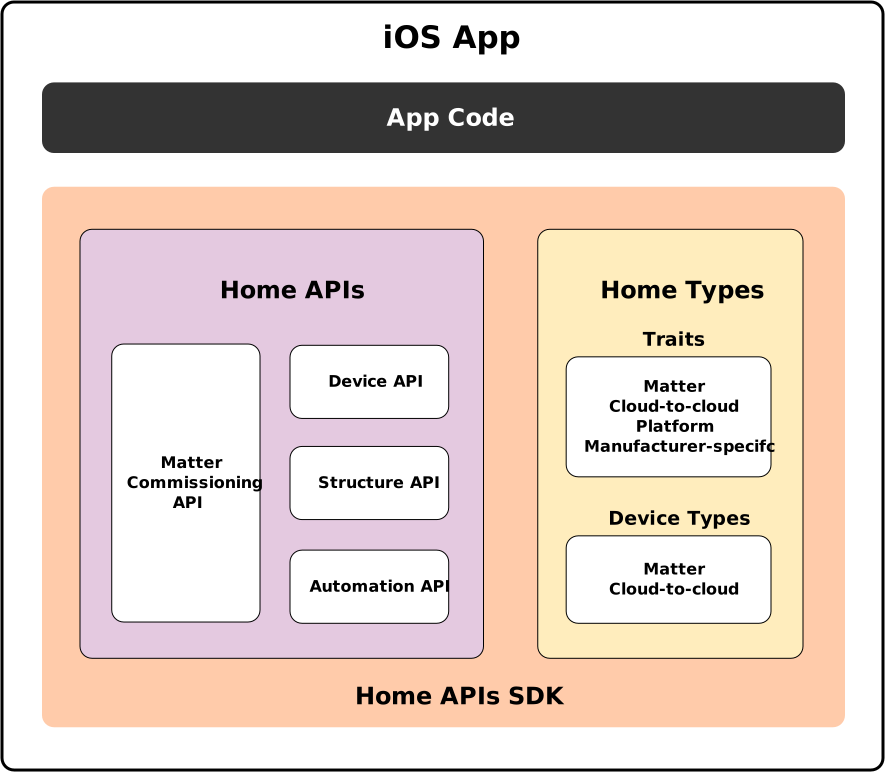 *Figure 1: Architecture of the Home APIs for an iOS app*
> [!IMPORTANT]
> **Key Point:** These concepts are similar to those already found in [Google Home Graph](https://developers.home.google.com/cloud-to-cloud/primer/home-graph.md.txt), which provides contextual data about the home and its devices in the Google Home ecosystem.
Home API device types may be backed by
[Matter](https://developers.home.google.com/matter.md.txt), an open standard for
the smart home, or be a Cloud-to-cloud device in the Google Home
ecosystem. Some device types may incorporate functionality from both. See
[Supported device types on iOS](https://developers.home.google.com/apis/ios/supported-device-types.md.txt)
for more information.
In Matter, device functionality is grouped by clusters,
which are represented in the Home APIs as Matter
standard traits. The Home APIs support the standard set of
Matter clusters as defined in the current
Matter specification.
In the Google Home ecosystem, device functionality is grouped by smart home
traits, which are represented in the Home APIs as Google smart home traits.
The Home APIs support the set of smart home traits as defined in the
[Cloud-to-cloud](https://developers.home.google.com/cloud-to-cloud/traits.md.txt)
program.
Other traits, such as Manufacturer-specific clusters and Platform traits, are
also available. To learn more, see [Data model on iOS](https://developers.home.google.com/apis/ios/data-model.md.txt).
## Ecosystem
The Google Home ecosystem provides a streamlined foundation for building,
managing, securing and integrating smart home experiences. Figure 2 shows how
the components all work together.
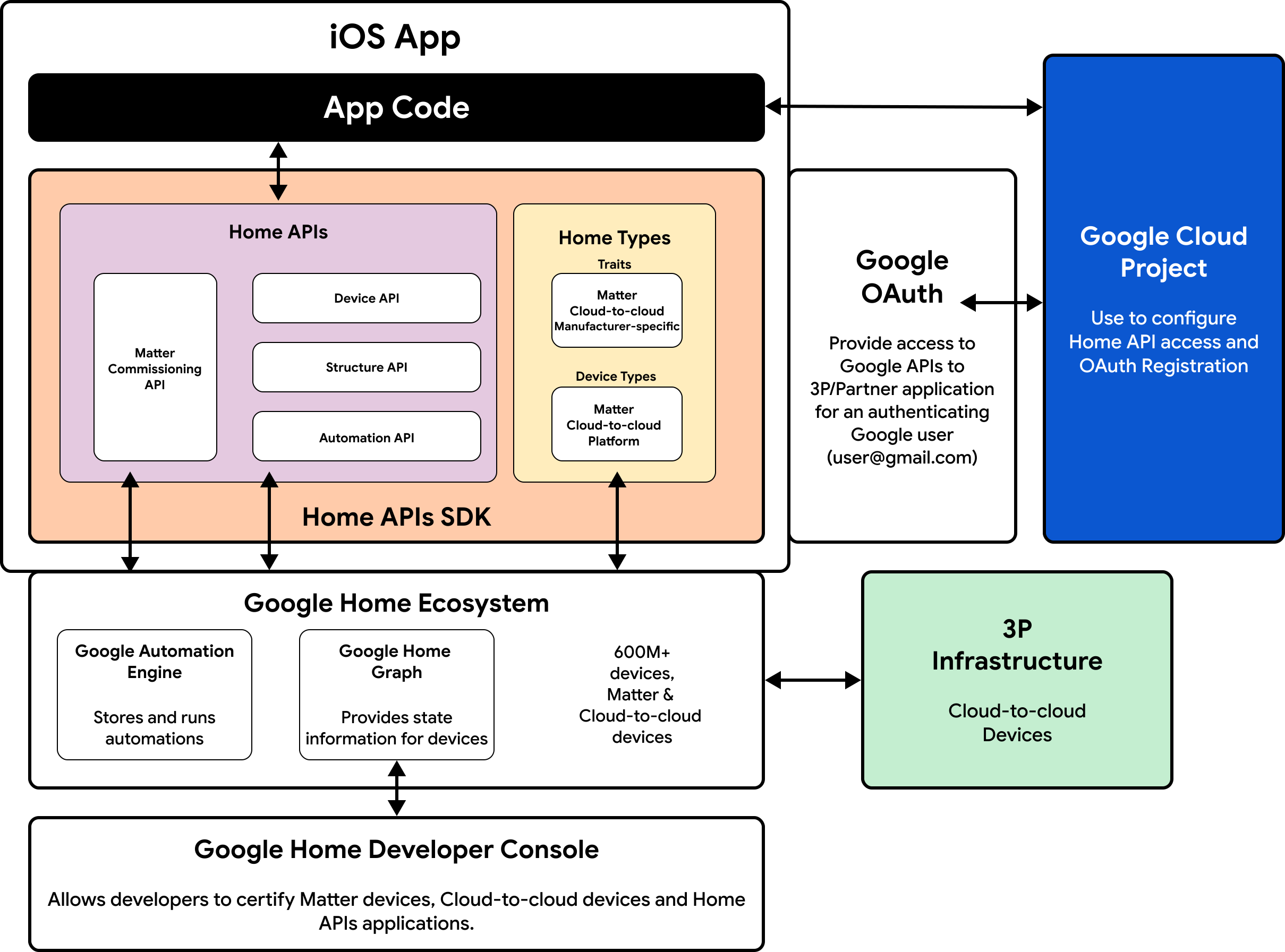 *Figure 2: The Home APIs ecosystem for an iOS
app*
The ecosystem includes the **Google Automation Engine** which stores and
runs [automations](https://developers.home.google.com/apis/ios/automation.md.txt) which provide a way to
automate tasks and device settings in a home.
The Home APIs uses
[**OAuth 2.0**](https://developers.google.com/identity/protocols/oauth2)
to grant access to devices in the structure. OAuth allows a user to grant
permission to an app or service without having to expose their login
credentials.
The **Google Home Developer Console** is used to manage all stages of a Home APIs
project, from brand verification, to developing, testing, and certifying to
ultimately launching. It streamlines the development process while delivering
robust tools and distribution through the Google Home ecosystem.
> [!WARNING]
> **Important:** The Google Home Developer Console is not yet available for registration.
## Language
The Home APIs for iOS are written in Swift
and provide an idiomatic Swift interface to manage state and subscription.
We recommend getting familiar with the Swift documentation, if you are not
already:
- [Develop iOS apps with Swift](https://developer.apple.com/develop/)
- [Learn Swift for iOS](https://developer.apple.com/swift/)
- [SwiftUI helps you build great-looking iOS apps](https://developer.apple.com/xcode/swiftui/)
- If you're working with the Automation API, reading about [Swift Result Builders](https://docs.swift.org/swift-book/documentation/the-swift-programming-language/advancedoperators/#Result-Builders) is useful in understanding how the Automation DSL works.
## Entity identifiers
Each entity in the Home APIs has an ID which represents its primary
identifier. This ID is a unique and stable identifier that will never change
for the lifetime of the entity. This ID can be used to cache objects or check
for equality as the metadata of an entity can change.
See the [`identifier`](https://developers.home.google.com/reference/swift/GoogleHomeSDK/Classes/Home.md.txt#identifier)
interface to learn what entities have an ID.
## Terminology mapping
Entities in the Home APIs map to Matter and
Cloud-to-cloud concepts as follows:
| Home APIs | Matter | Cloud-to-cloud |
|---|---|---|
| Trait | Cluster | Trait |
| Attribute | Attribute | Attribute, State |
| Command | Command | Command |
| Event | Event | Follow up response, Notification |